
On this page
What the names look like
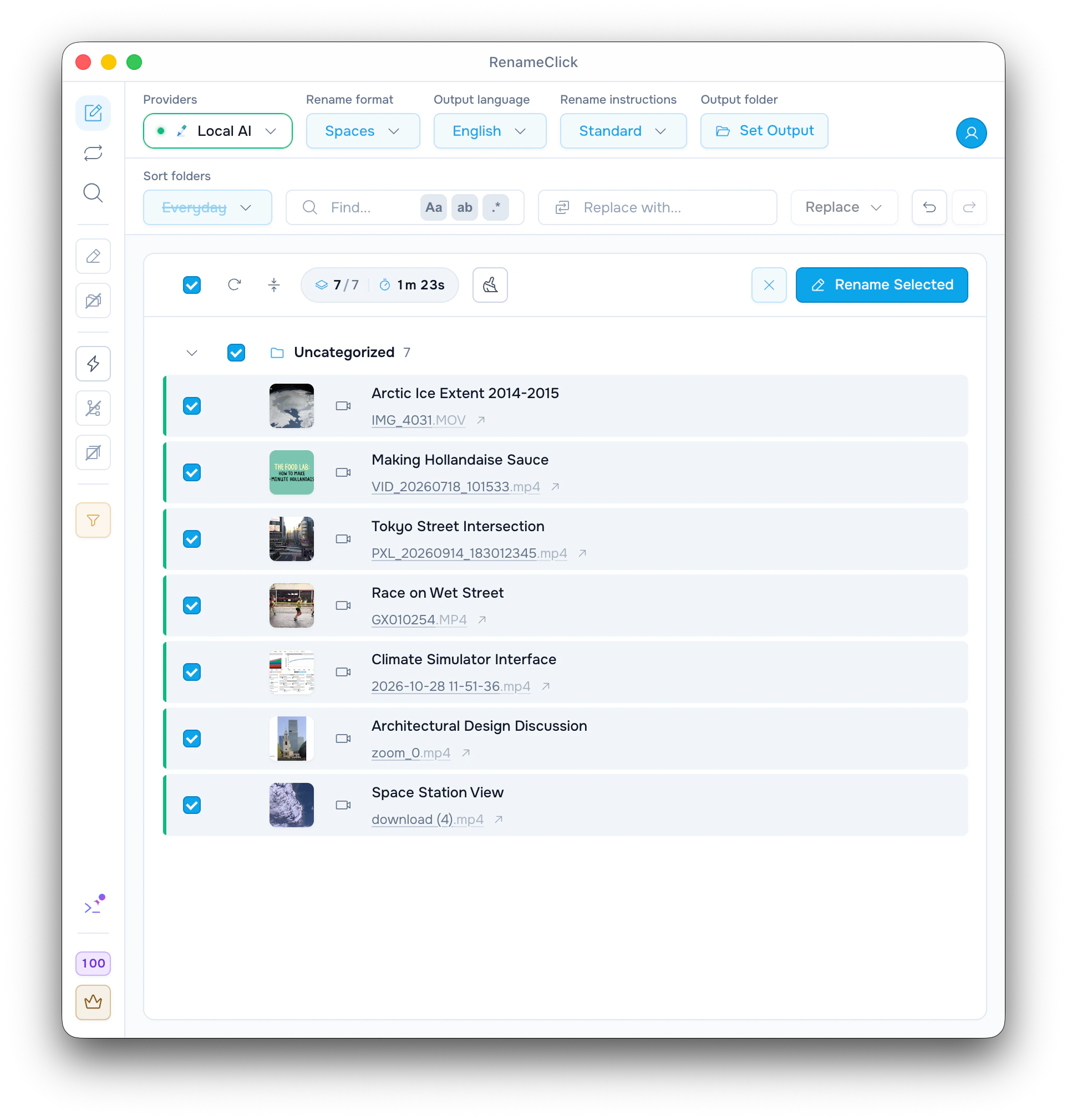
RenameClick looks at pictures from across each video, listens to the speech on your computer, and suggests a name from both. Seven videos from the screenshot:
| Original | Suggested name | What the video is |
|---|---|---|
| IMG_4031.MOV | Arctic Ice Extent 2014-2015 | A news clip about Arctic sea ice |
| VID_20260718_101533.mp4 | Making Hollandaise Sauce | A cooking tutorial |
| PXL_20260914_183012345.mp4 | Tokyo Street Intersection | A time-lapse of a crossing, no sound track |
| GX010254.MP4 | Race on Wet Street | Runners in a city marathon |
| 2026-10-28 11-51-36.mp4 | Climate Simulator Interface | A screen recording with narration |
| zoom_0.mp4 | Architectural Design Discussion | An interview with an architect |
| download (4).mp4 | Space Station View | Earth filmed from orbit |
Settings: Local AI with Audio Transcription installed, Spaces, English, Standard instructions, Sort off. These are the names from that run, not a promise for other videos. Only the name changes; the video and its extension stay as they are.
Set up and add videos
A video needs a model that reads images. Speech is optional and makes names more specific.
- Open AI & Models and install RenameClick Local AI (about 4 GB) for names made on your computer.
- Install Audio Transcription there too, so that what people say counts.
- On the Rename screen, keep All files or choose Video in the file-type filter.
- Drop MP4, MOV, M4V or 3GP videos, or a folder with them.
- Check the names, tick the rows you want and click Rename Selected.
Without Audio Transcription, videos are still named, from their pictures only, and the filter shows a note with Install under Video. Instead of Local AI you can use a cloud provider, LM Studio or Ollama with a model that reads images.
What RenameClick takes from a video
It does not watch every frame. It takes up to 6 pictures from across the whole video, not only the start. When a downloaded video has a cover picture or a title saved in the file, those are used too. With Audio Transcription, the speech is turned into text on your computer; long videos are sampled, up to 5 minutes of speech.
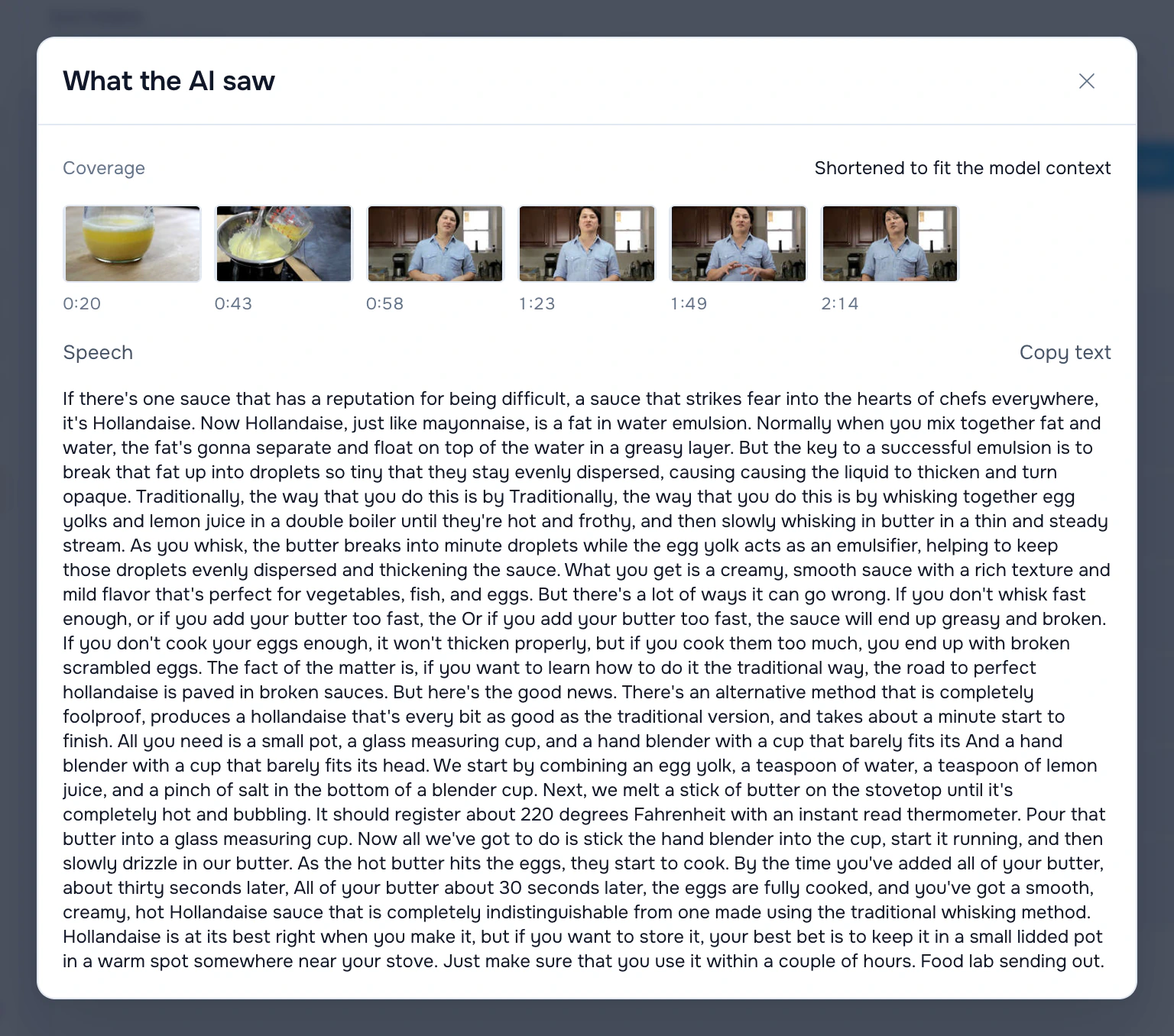
What the AI saw on a row shows what a name came from. For the cooking video it lists six pictures, at 0:20, 0:43, 0:58, 1:23, 1:49 and 2:14, and the narration as plain text. Named from its pictures alone, the same video came out as Cooking Process. The speech turned it into Making Hollandaise Sauce.
Check names of people, places and products before you rename. Click a name to edit it, or Re-run the row for another suggestion. Rename Selected changes only the ticked rows, at one apply credit each, and Undo in the toolbar reverts it.
Add the recording date or place
Phones and cameras save when and where a video was recorded, and which camera made it. Your own Rename format can put that into the name:
$date{YYYY-MM-DD,taken} $1
$date{YYYY-MM-DD,taken}_$exif{location; else=""}_$1
With the first, a clip recorded on 18 July 2026 gets a name like 2026-07-18 Making Hollandaise Sauce. The second adds the city and country when the phone saved a place. Screen recordings and downloads usually have no place, and that part is left out.
Video details on a row shows what the file has: recording date, place and camera, plus duration, resolution, frame rate and codec.
See the date and EXIF folders guide for folder paths built from the same dates and places.
Sort videos into folders
Turn Sort on to move videos while they are renamed. In the built-in Everyday and Media Files folder sets, every video goes to the Videos folder. A Date and place set, such as Capture date, files each video by its recording date, for example into 2026/07/18.
Auto Flow rules can do the same for a watched folder. A rule takes videos only after you tick Video in its file types, so a rule you already have does not start moving videos by itself.
What stays on your computer
The pictures are taken and the speech is transcribed on your computer. With Local AI selected, the name is made there too. With a cloud provider, the pictures and part of the speech text go to that provider, the same way photos do. The video file itself is not sent.
See provider setup and data handling for the full reference.
If a video gets no useful name
- Unsupported: the system cannot decode this video. If a video plays in QuickTime Player or the Windows Media Player app, RenameClick can read it. On Windows, HEVC videos need the HEVC Video Extensions from the Microsoft Store.
- MKV, WebM and AVI files are skipped. Convert them to MP4 first.
- The name is too general: install Audio Transcription and Re-run the row.
- Speech in a language the speech model does not know is left out, and the pictures still name the video.
- This model can't read images: choose a model that reads images.
See video formats and how a video is read for the full reference.