AI Providers & Models
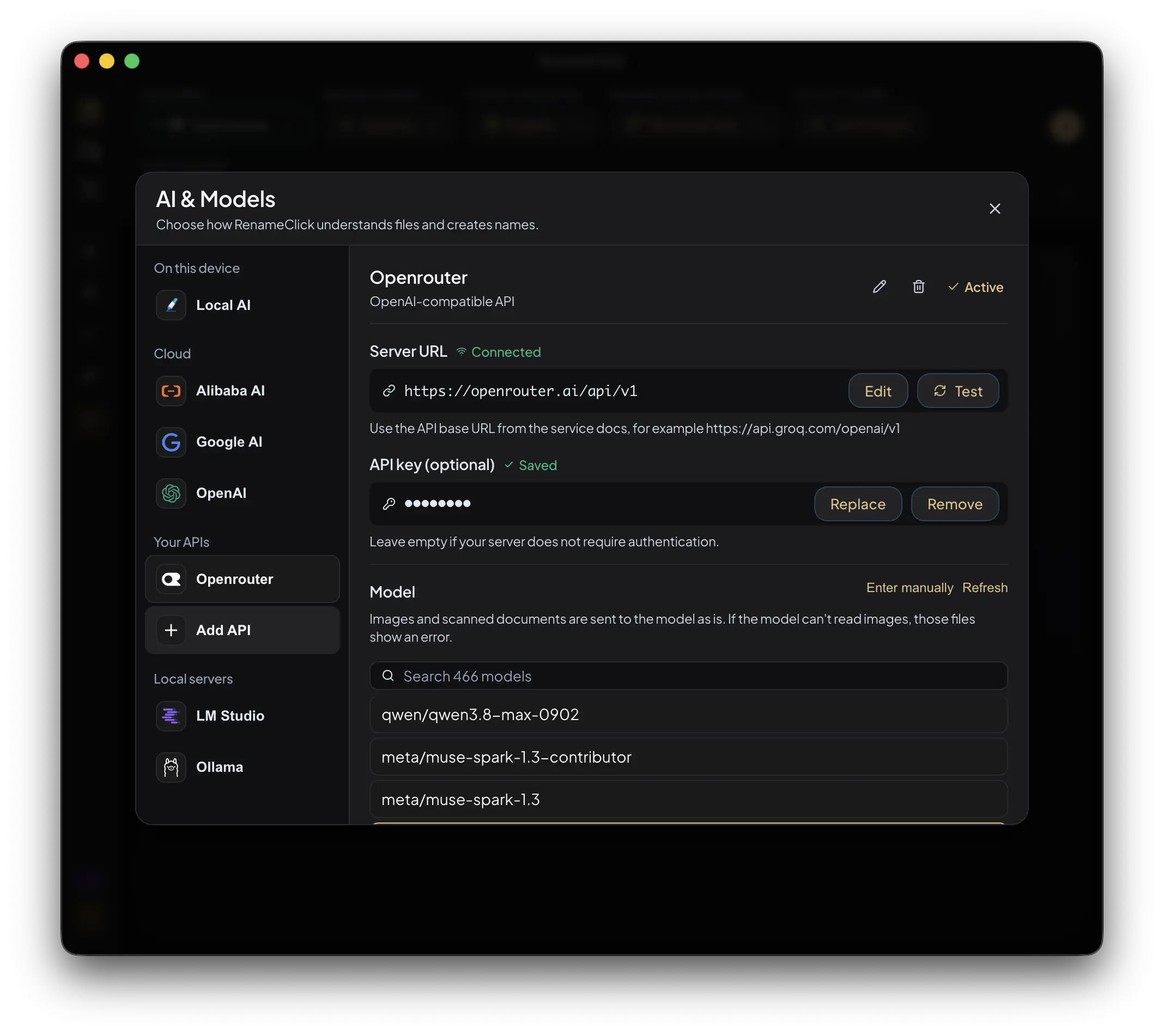
Choose built-in Local AI, a configured model server, an optional cloud provider, or any OpenAI-compatible API such as OpenRouter, Groq or Langdock, with channel and data-handling limits.
Updated Applies to RenameClick 2.19.0
Choose Where Analysis Runs
| Provider | Setup | Where content is processed |
|---|---|---|
| RenameClick Local AI | Install the built-in capability | On your computer |
| LM Studio | Run a compatible model server and configure its base URL | At the configured server |
| Ollama | Run a compatible model server and configure its base URL | At the configured server |
| OpenAI | Your API key and a supported model | OpenAI’s service |
| Your API key and a supported Gemini model | Google’s service | |
| Alibaba Cloud | Your API key and a supported model | Alibaba Cloud’s service |
| OpenAI-compatible API | The service’s API URL, your API key and a model | The service you connect, such as OpenRouter, Groq or Langdock |
Cloud providers and OpenAI-compatible APIs are available in direct macOS and Windows builds, not the Mac App Store build. Select a model that supports the content you need, including vision for images and scanned PDFs. No provider is ranked here for accuracy or speed; those depend on the model, input, and settings.
Local AI
Install RenameClick Local AI in AI & Models. The model download is about 4 GB. Once installed and selected, it can analyze files without internet or an external API charge.
The model needs working RAM or VRAM in addition to disk space. Hardware acceleration and CPU fallback depend on the platform. More context uses more memory; it does not guarantee better results.
Audio Transcription
Install Audio Transcription separately for MP3, WAV, FLAC, M4A, and AAC speech recordings. Transcription runs locally. The selected naming provider then receives part of the transcript to create the name.
With Local AI selected, both stages stay on the device. With an optional cloud naming provider, the transcript text goes to that provider; the audio itself is transcribed locally. Long recordings are sampled according to Analyze up to. Audio limits.
LM Studio and Ollama
Both providers connect RenameClick to a model server you run separately. Keep the server running while RenameClick processes files. The steps below show an LM Studio setup using Qwen3 VL 4B as an example vision model.
Step 1: Install LM Studio
Download and install LM Studio. Allow disk space for the model download and enough RAM or VRAM to load it. Memory requirements depend on the model and context settings.
Step 2: Download a Vision Model
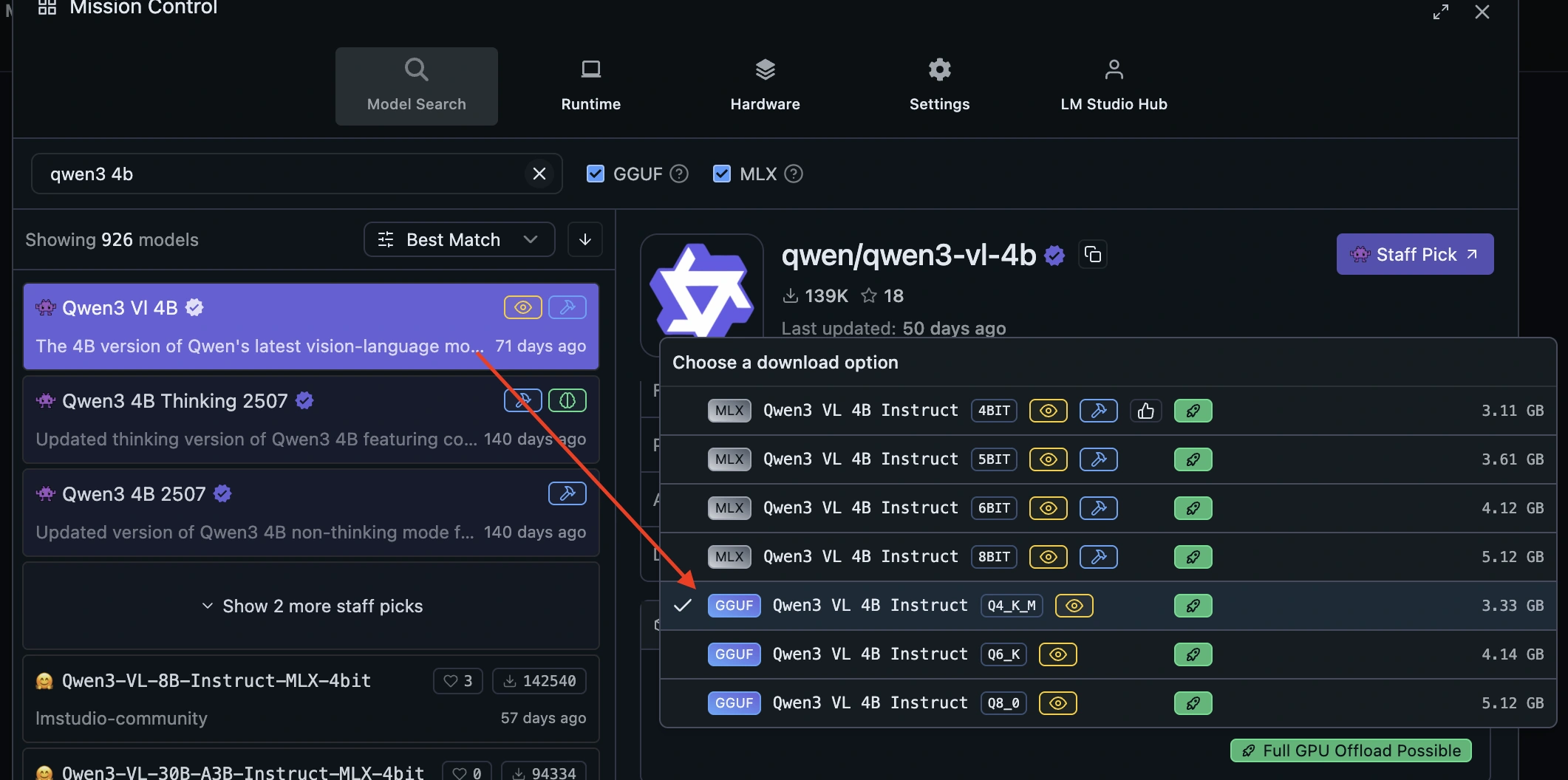
- Open Model Search in LM Studio and search for
qwen3-vl-4b. - Select Qwen3 VL 4B. The screenshot shows the GGUF Q4_K_M download option.
- Download the model and wait for completion. Use a vision-capable model for images and scanned PDFs.
Step 3: Load the Model and Start the Server
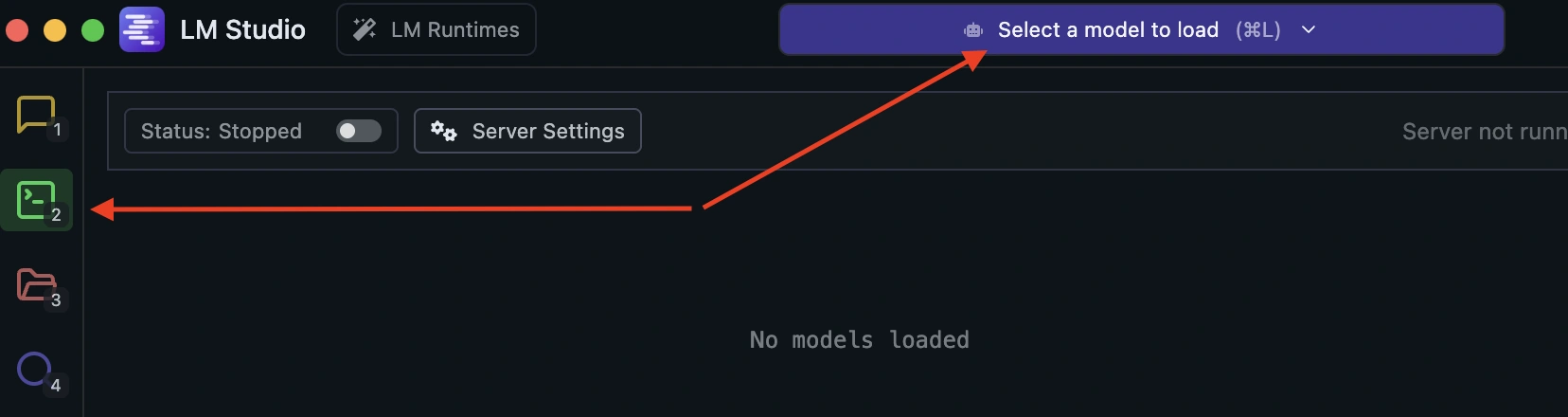
Open the Developer tab, choose Select a model to load, and load the downloaded model.
Turn on the server switch. Check that the server shows Running and the model is Ready, then copy the address shown beside Reachable at. The example below uses http://127.0.0.1:1234.
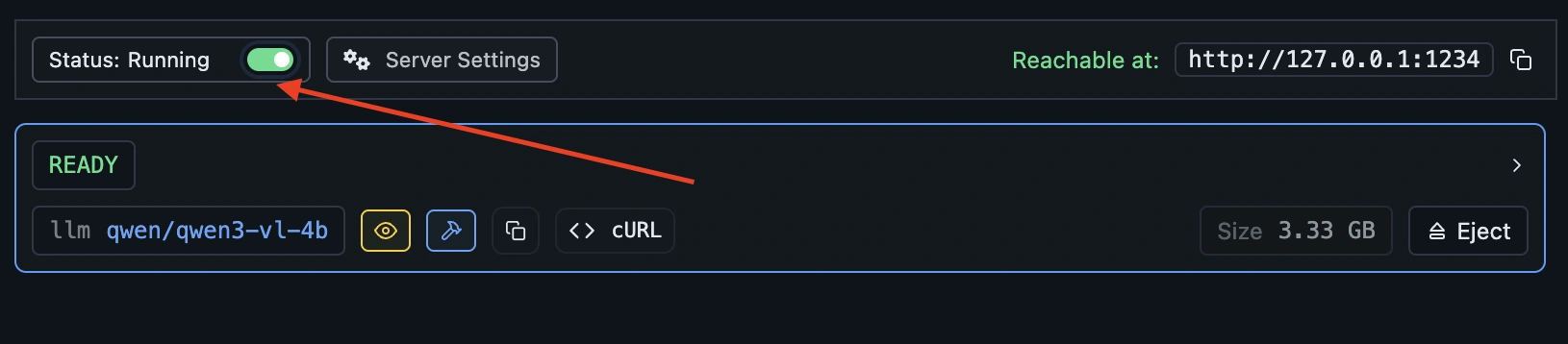
See LM Studio's local server guide for its server controls.
Step 4: Connect RenameClick
Stop AI Search and stop watching in all Auto Flow rules before switching providers. Open AI & Models and select LM Studio. In the earlier RenameClick interface shown below, use the provider dropdown and Configure Models to reach these settings.
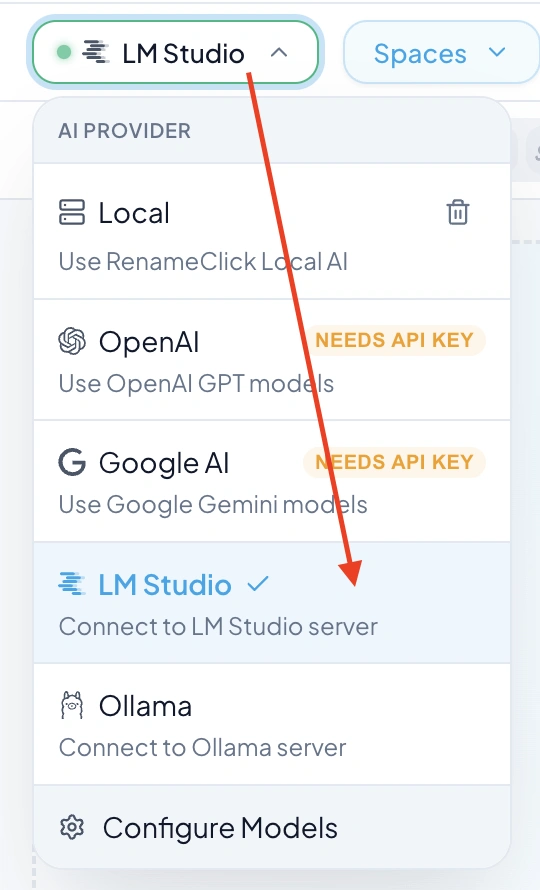
- In the LM Studio settings, set Server URL to the address shown by your running server. For a server on the same computer,
http://localhost:1234is another usual local address. - Choose Test and check for Connected.
- Refresh the model list and select the loaded vision model, such as
qwen/qwen3-vl-4bin this example. - Confirm that LM Studio is the active provider, then try processing a file.
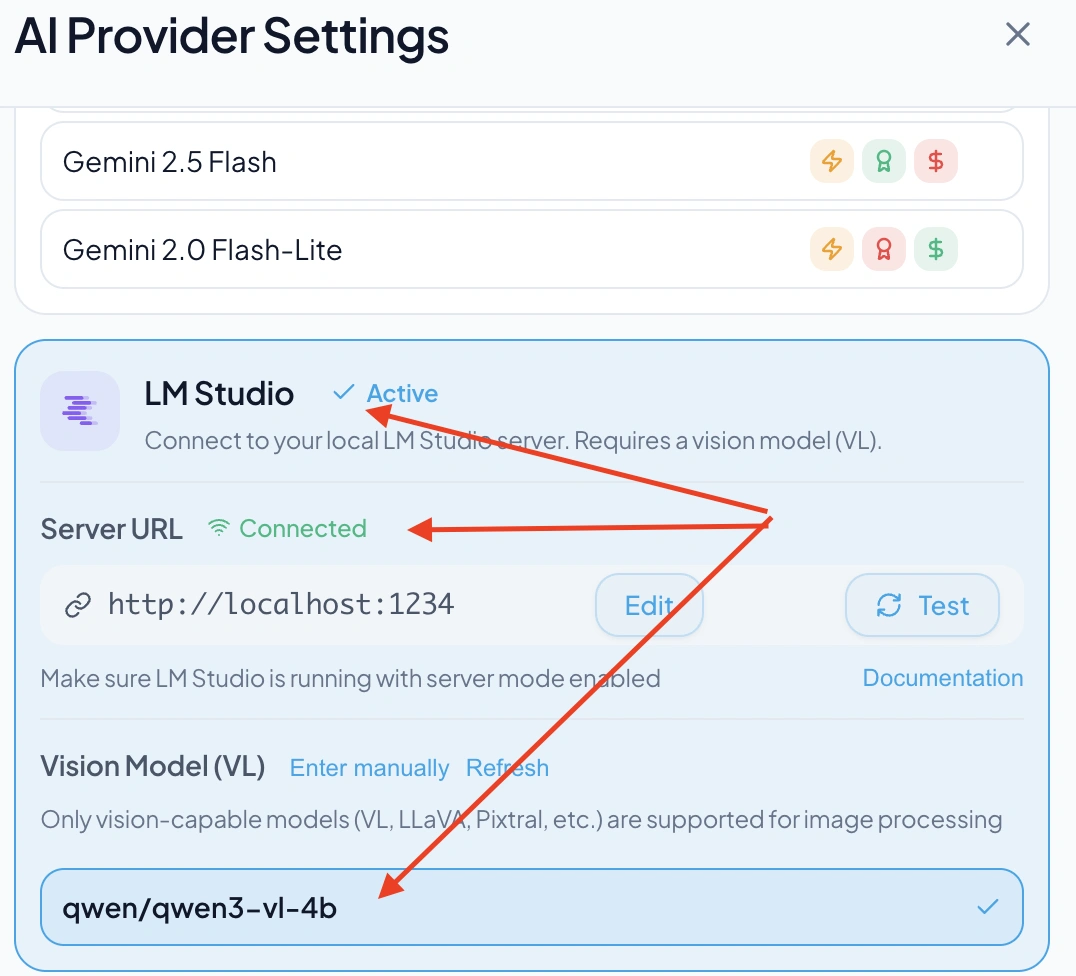
If the connection fails, check that LM Studio is still running and that the server address matches. If the model is missing, load it in LM Studio and refresh the model list in RenameClick.
Ollama Setup
Load a compatible model in Ollama and start its server. Select Ollama in RenameClick, set the base URL to the address your server exposes, and choose an available model. Ollama’s usual local address is http://localhost:11434.
For either provider, a server on another machine receives the content over that connection; selecting LM Studio or Ollama does not by itself mean the files stay on this computer. Model downloads may require internet even when later inference is local.
Cloud Providers
Enter the provider’s API key in its settings and select a supported model. Network access and any account balance or billing required by the provider are separate from RenameClick Pro. A Pro license does not include third-party API usage.
The provider receives the image, the text extracted from a document, or part of an audio transcript, depending on the file. Review the provider’s terms before choosing it for files with restricted handling requirements.
OpenAI-Compatible APIs
Connect any service that offers an OpenAI-compatible chat API: model marketplaces such as OpenRouter, inference services such as Groq, company AI platforms such as Langdock, model makers such as Mistral or DeepSeek, or a server you host yourself, such as vLLM. OpenRouter, Groq and Langdock below are examples; the steps are the same for every compatible service. The service you connect receives the same content as a cloud provider and bills usage to your account with it.
Add an API
- Create an API key in the service’s console. The examples below link to the right page.
- Open AI & Models and click Add API under Your APIs.
- Enter a Name. It is how the API appears in the provider list, for example
OpenRouter. - Enter the API URL exactly as the service documentation gives it. It usually ends in
/v1; don’t add/chat/completions. - Paste the key into API key (optional) and click Add. Leave the key empty only for a server that doesn’t require one.
- Check that Server URL shows Connected. Pick a model from the list, or choose Enter manually to type a model ID, then click Use for naming.
RenameClick checks the connection and loads the model list from <API URL>/models. A long list gets a search field.
Examples
| Service | API URL | API key | Service documentation |
|---|---|---|---|
| OpenRouter | https://openrouter.ai/api/v1 | openrouter.ai/settings/keys | Quickstart |
| Groq | https://api.groq.com/openai/v1 | console.groq.com/keys | OpenAI compatibility |
| Langdock | https://api.langdock.com/openai/eu/v1 (EU) or https://api.langdock.com/openai/us/v1 (US) | A personal API key or a workspace key with the Completion API scope | OpenAI completion API |
- OpenRouter lists models from many providers under one key. To see the models that read images, filter the catalog by image input. Free models have lower rate limits and can be temporarily unavailable.
- Groq lists the models that read images in its vision documentation. Its other models handle text documents only.
- Langdock shows the models available in your workspace. A dedicated deployment uses
<your-deployment-url>/api/public/openai/eu/v1, orusin place ofeu. A workspace admin can issue a workspace key.
For any other service, take the base URL from its OpenAI compatibility documentation, for example https://api.mistral.ai/v1 for Mistral or https://api.deepseek.com for DeepSeek.
Images and Text-Only Models
Images and scanned documents are sent to the selected model as they are. A model that can’t read images fails those files with This model can’t read images and a Choose a vision model button; text documents still work with it. When the service reports which models accept images, as OpenRouter and Mistral do, text-only models are marked in the model list. Other services don’t report it, so check the model in the service’s catalog.
Several APIs
Each saved API keeps its own name, API URL, key and model. Switch between them in the provider menu; the settings button next to a provider opens it in AI & Models. Rename changes the name, and Remove deletes the API together with its saved key.
Switching Providers
Choose a provider in AI & Models and check its readiness indicator. Stop AI Search and stop watching in all Auto Flow rules before changing provider or model settings. Resolve an unavailable key, endpoint, or model before retrying a failed file.
Offline Use
Local file processing can work offline after the required models are installed. Initial downloads, license activation or recovery, and purchase restoration have their own network requirements. These are separate from the location of file analysis. Installation · Credits and licenses.