
Video files
Rename Video Files by What Happens in Them
Give phone clips, screen recordings, meeting recordings and downloads names based on what they show and what is said in them. Pictures and speech are read on your computer; choose Local AI to keep naming local too.

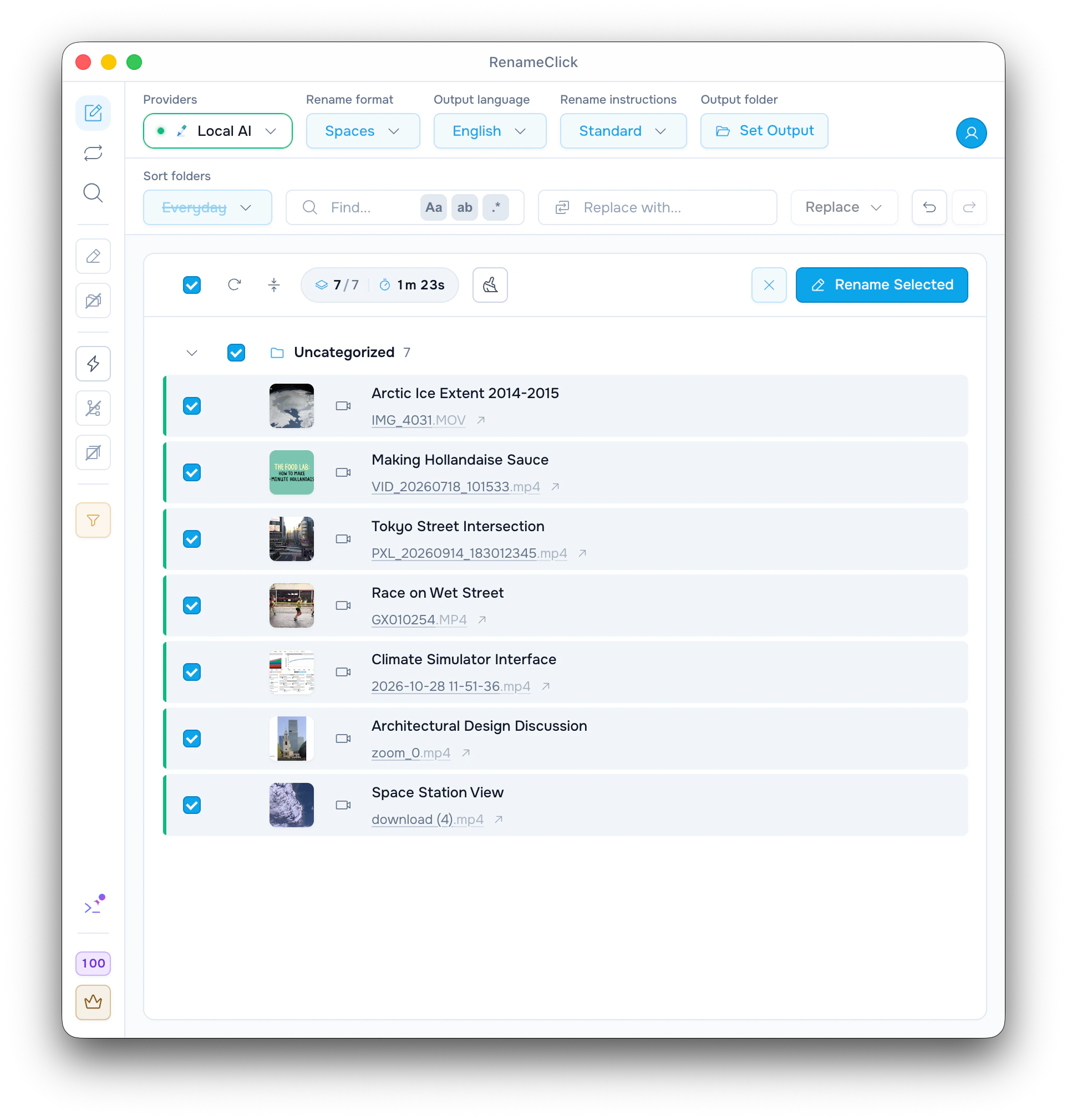
Pictures and speech become the naming context
RenameClick takes up to 6 pictures from across a video and, with Audio Transcription installed, turns its speech into text on your computer. The naming model suggests a filename from both. The original video and its extension are preserved. This is not a full transcript or a summary of the video.
MP4, MOV, M4V, 3GP
Pictures from across the whole video
Speech with Audio Transcription
Before and after examples
| Original | Suggested name |
|---|---|
VID_20260718_101533.mp4 | Making Hollandaise Sauce.mp4A cooking tutorial, named from its pictures and narration. |
2026-10-28 11-51-36.mp4 | Climate Simulator Interface.mp4A screen recording with narration. |
PXL_20260914_183012345.mp4 | Tokyo Street Intersection.mp4A time-lapse with no sound track, named from its pictures. |
Useful for videos with camera names
- Phone and camera clips named IMG_4031.MOV or VID_20260718_101533.mp4.
- Screen recordings and meeting recordings you want to recognize by topic.
- Downloaded videos with names like download (4).mp4.
Get started
- 1
Install RenameClick Local AI in AI & Models, and Audio Transcription if speech should count.
- 2
Choose Local AI and add videos on the Rename screen.
- 3
Inspect the suggestions and What the AI saw, then rename the selected files.
What the video results show
The screenshot shows the suggested names beside the original files. What the AI saw on a row lists the pictures that were sent, with their times, and the speech as text. Check proper nouns and the topic before applying; the model can misread a scene or miss a detail.
Speech is optional
Without Audio Transcription a video is named from its pictures only, and RenameClick says so with an Install button. Long videos are sampled, up to 5 minutes of speech. Speech in a language the speech model does not know is left out, and the pictures still name the video.
Dates, places and folders
The recording date, place and camera that phones and cameras save work in Rename formats and in Date and place folders, the same as for photos. The Everyday and Media Files folder sets have a Videos folder. Auto Flow rules take videos after you tick Video in the rule's file types.
Local and cloud naming
Pictures are taken and speech is transcribed on your computer. With Local AI selected and installed, naming also stays on the device. A cloud provider with a model that reads images receives the pictures and part of the speech text, not the video file, and has its own API charges.
Analysis does not use RenameClick credits. Free includes 100 renames or moves each month. Renaming and moving one file in the same action uses one credit; failed changes use none. Pro removes the apply limit. External API charges are separate.
Documentation and guide
Check the documented controls and edge cases, or follow the practical setup guide.
Ready to try it on your own files?
On macOS and Windows, the Local provider works offline after its one-time model download. Review suggestions before applying changes.