
Product comparison
RenameClick vs Renamer.ai
Compare price, what the limit counts, where files are processed, review before renaming, and file types, using each product’s published information.
- Official product sources
- Checked November 12, 2026
- No speed or accuracy ranking

This comparison covers documented features and prices, not a benchmark. Details the other vendor does not state are marked as not stated.
Before and after examples
| Original | Suggested name |
|---|---|
invoice_7643_final.pdf | 2026-04-03_acme-supplies_invoice_7643.pdfSupplier, date and number read from the document text with Custom Instructions. |
VID_20260718_101533.mp4 | Making Hollandaise Sauce.mp4A cooking video, named from its pictures and narration. |
recording_042.m4a | Project Kickoff Summary.m4aSpeech transcribed on the device after installing Audio Transcription. |
Feature comparison
| Feature | RenameClick | Renamer.ai |
|---|---|---|
| Plans and prices | Free plan, then Pro at $8/month or $36 once (lifetime), plus applicable tax. Apple pricing is separate. RenameClick source | Free Starter plan with 25 files a month. Paid plans by monthly file count: Pro $9.95 (200 files), Power User $29.95 (1,000), Ultimate $99.95 (5,000) per month. Annual billing is listed; a one-time purchase is not. Official source |
| What the limit counts | Analysis and suggested names are unlimited. Free includes 100 applied renames or moves each month; Pro removes the limit. RenameClick source | One credit per renamed file, from the plan’s monthly allowance. Unused monthly credits do not carry over. Official source |
| Review before files change | Analysis only creates suggestions. Files change when you apply the selected rows. RenameClick source | The desktop guide says files are renamed on disk as the batch runs, with no separate apply step; a batch can be paused. Official source |
| Undo | Undo reverts the most recent Apply as one step and restores names and locations; Redo reapplies it. RenameClick source | Revert works per file. Files renamed by a Magic Folder do not offer Revert. Official source |
| Where the AI runs | Local AI on your computer is the default, after a one-time model download. LM Studio, Ollama and cloud providers with your own API key are optional. RenameClick source | Its servers by default. A model downloaded to the computer is an optional mode, and so is your own API key where the account has that option. Official source |
| File types | Images, PDF and office documents, text files, speech audio (MP3, WAV, FLAC, M4A, AAC) and video (MP4, MOV, M4V, 3GP). RenameClick source | Documents and images are renamed by their content. Its video guide says it does not process video or audio files. Official source |
| Find files by content | AI Search indexes a folder on the device and finds files from a description; matches can be renamed or moved. RenameClick source | Not stated. The guides describe no search inside file contents. Official source |
| Folder automation | Auto Flow rules watch folders while the app runs. Review the results first or turn on Auto Apply. RenameClick source | Magic Folders watch a folder and rename each file that lands in it automatically. Official source |
| Platforms | A desktop app for macOS (direct download or Mac App Store) and Windows (Microsoft Store). RenameClick source | A desktop app for Windows and Mac and a web interface are listed. Official source |
Official product sources checked . Features and prices can change; verify the linked sources before buying.
If you are looking for a Renamer.ai alternative
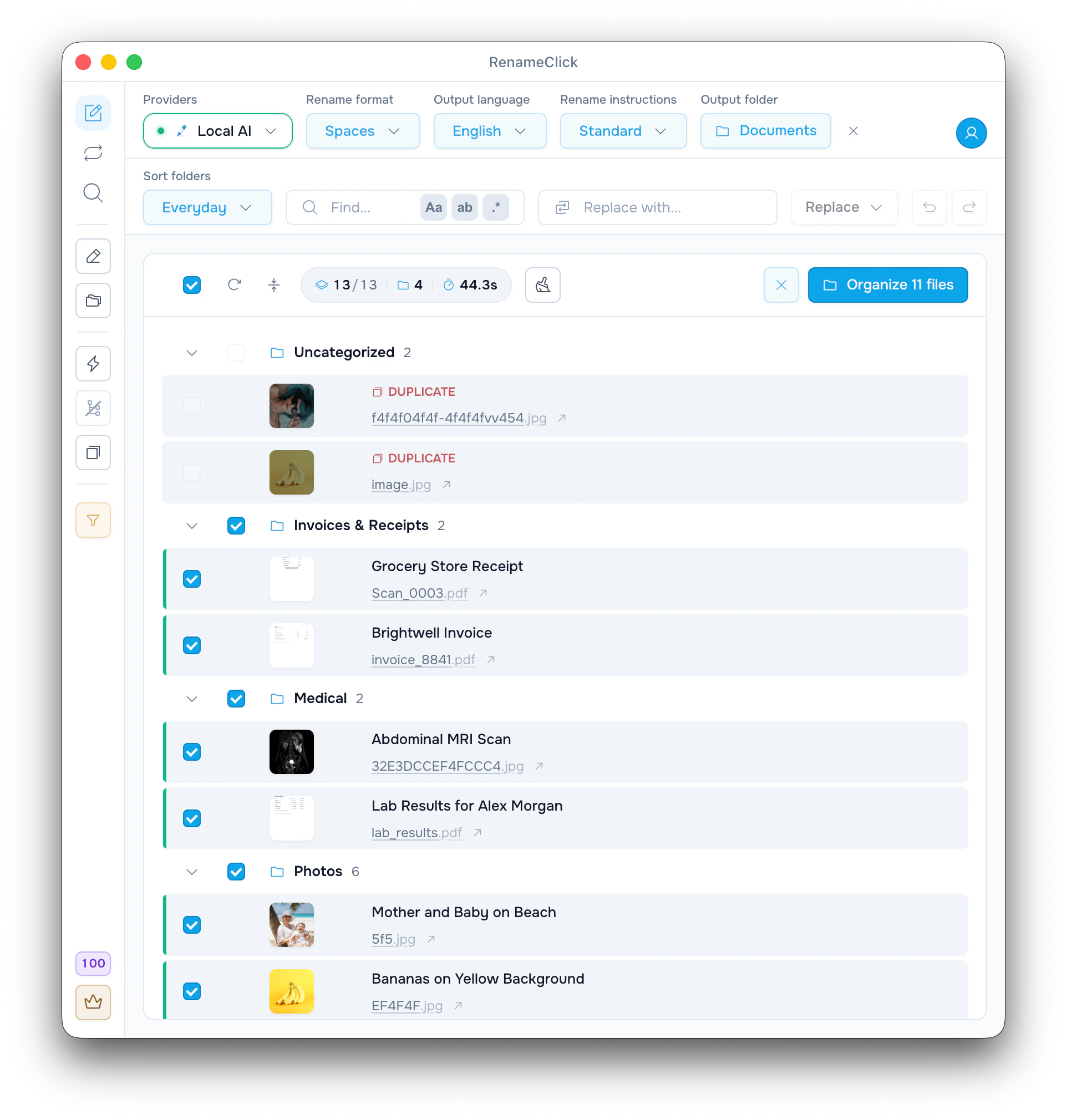
RenameClick reads documents, scans, photos, speech recordings and videos, then suggests a name and a folder for each file. Nothing changes on disk until you apply: edit a name, untick a row, apply the rest, and Undo reverts the whole batch.
Analysis does not use credits, so you can run a full folder and judge the names first. Free covers 100 applied renames or moves each month. Pro is $8 a month or $36 once.
Local AI is the default
After a one-time model download of about 4 GB, files are read and named on your computer. Plan for about 4 GB of model memory; 16 GB of system RAM is recommended.
LM Studio and Ollama work as local model servers. Cloud providers such as OpenAI and Google are optional in the direct builds and use your own API key.
Names for invoices, scans, photos and videos
Custom Instructions are a naming prompt: ask for the date, supplier and number of an invoice, and the name is built from the document text. Formats add dates, EXIF details, counters and case rules.
A video gets its name from pictures taken across the whole video and, with Audio Transcription installed, from the speech. Speech recordings are transcribed on the device.
Check current terms before choosing
Each row links to the official page it was taken from. Renamer.ai’s own pages differ on some points: its guides and changelog describe a local model and watched folders, and some of its other pages say it has neither. The table follows the guides, the plan table and the changelog. Whether its local mode uses plan credits is not stated. An unconfirmed detail is not evidence that a feature is absent.
FAQ
Is RenameClick a one-time purchase?
Pro for the direct macOS and Windows builds is $36 once (lifetime) or $8 a month, plus applicable tax. The license is linked to the purchase email and covers up to 3 active devices. The Mac App Store build is a separate purchase through Apple.
Does RenameClick charge per file?
Analysis and suggested names are unlimited on every plan. Free includes 100 apply credits each month: applying a rename, a move, or both to one file uses one credit, and failed changes use none. Pro removes the apply limit.
Can RenameClick name files without sending them to a server?
Yes. Local AI is the default provider and runs on your computer after a one-time model download of about 4 GB. A cloud provider receives file content only if you choose one and add your own API key.
Are files renamed before I check them?
No. Analysis only creates suggestions. Files change when you apply the selected rows, or when an Auto Flow rule has Auto Apply turned on.
Does RenameClick rename video and audio files?
Yes. MP4, MOV, M4V and 3GP videos and speech recordings in MP3, WAV, FLAC, M4A and AAC are supported. Speech is transcribed on the device after you install Audio Transcription.