RenameClick 2.15.2
Connect Auto Flow rules by using an applied output as another rule’s input. Folder routing now supports processing stages, rejects cycles and conflicting sources, and reports the stage of an operation.
 RenameClick
Release notes and product updates.
Connect Auto Flow rules by using an applied output as another rule’s input. Folder routing now supports processing stages, rejects cycles and conflicting sources, and reports the stage of an operation.
Auto Flow now identifies unavailable OneDrive and Google Drive files more accurately and can try to resume the cloud storage provider before retrying access.
Folder pickers now reopen at the current Source or Destination path, and missing or inaccessible folders show clearer messages.
Auto Flow now reads cloud-backed files completely before processing, so placeholders that are still downloading remain retryable instead of being treated as ready.
Processed and error lists can now be cleared without deleting or changing the files on disk.
Individual error rows can be excluded from the list, making long-running watched-folder workflows easier to manage.
Supported extension filters refresh when the optional audio model changes, keeping each Auto Flow row aligned with the formats currently available.
Windows launch, local processing, context-menu handoff, and preview worker lifecycle handling were hardened across the 2.14 updates.
Windows users can enable Launch at Login from RenameClick settings.
Preview failures caused by insufficient memory now show a specific, actionable message, and persisted thumbnails can recover when source access cannot be authorized.
Custom formats now support $words{...} selectors for exact Unicode words and inclusive ranges from generated or original names.
Word ranges support custom joiners and can be nested inside existing text transformations. See Format Patterns for the complete syntax.
The Windows image-processing pipeline now supports 24-bit BMP decoding.
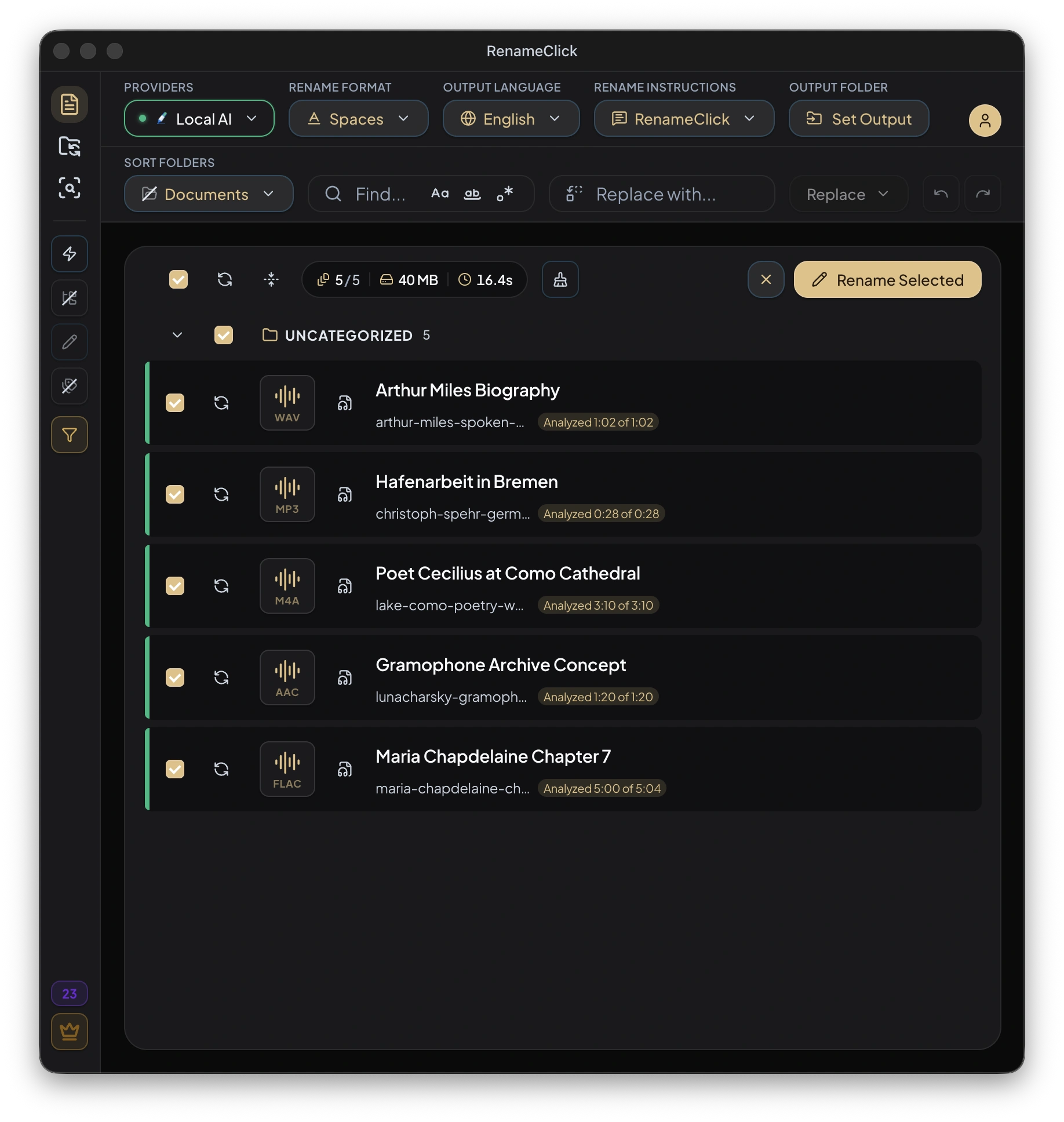
RenameClick can now process audio files by transcribing speech locally and using the spoken content to create clear filenames.
Install the optional audio transcription model in AI & Models. When RenameClick Local AI is installed and selected as the provider, both transcription and filename generation run on your device.
Audio processing supports MP3, WAV, FLAC, M4A, and AAC files.
Image support now includes AVIF, JFIF, and JPE.
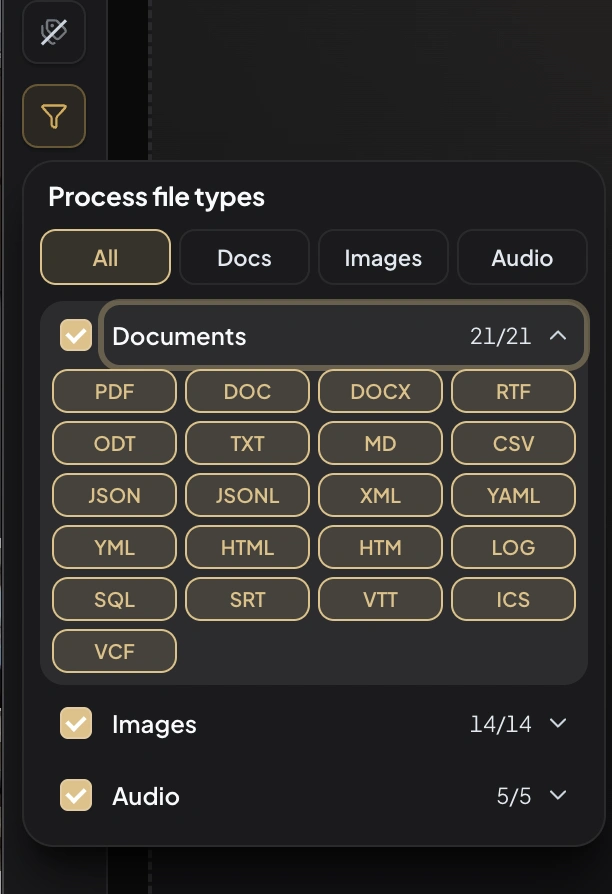
Document and text processing now includes JSON, JSONL, XML, YAML, YML, HTML, HTM, LOG, SQL, SRT, VTT, ICS, and VCF.
The file type filter includes the expanded format list, so you can limit each workflow to the exact formats you want to process.
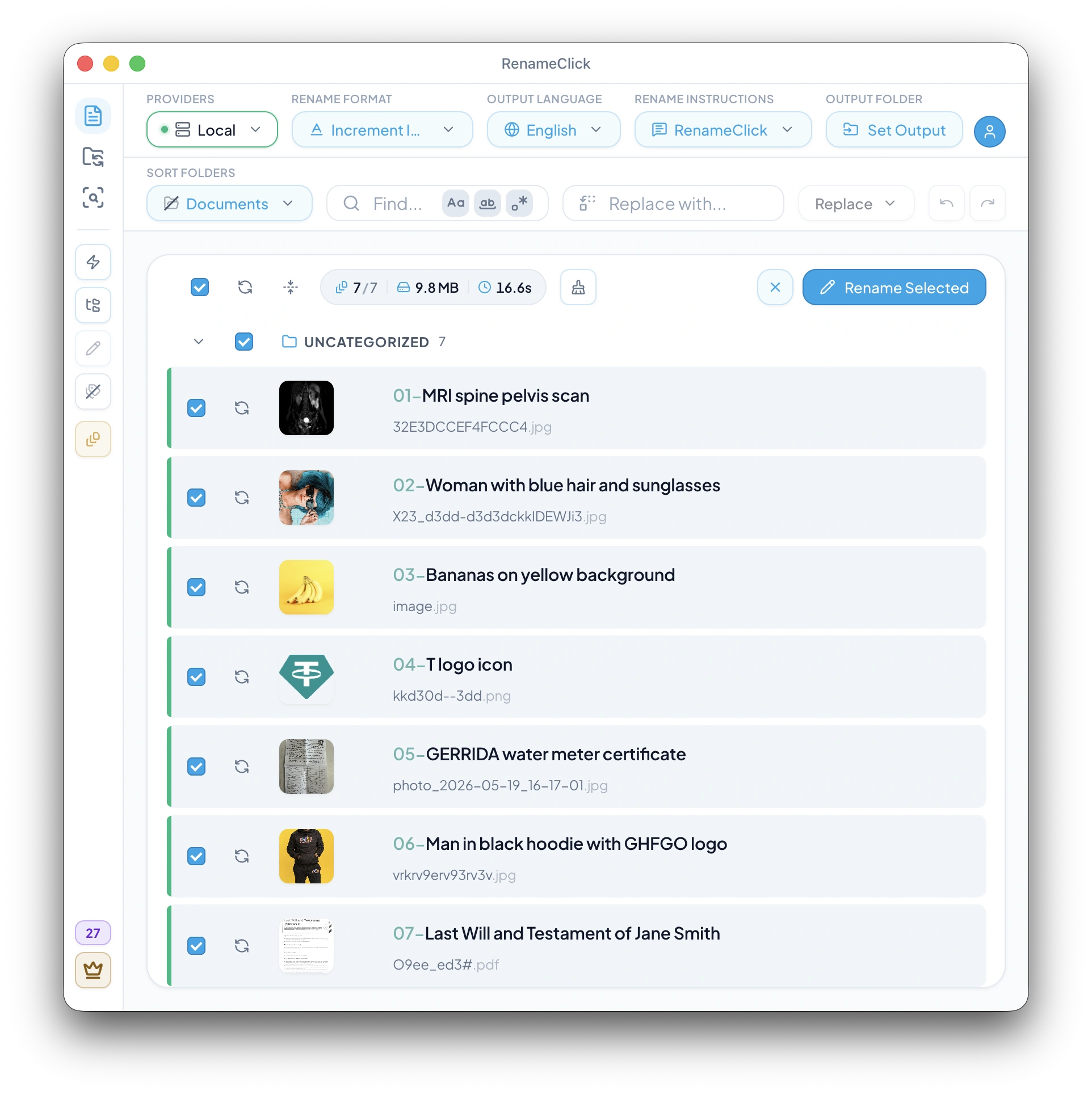
Custom format presets now support $successIndex, an auto-increment counter for files that completed successfully.
Use patterns like $successIndex{01}_$1 or $successIndex{001}_$1 to create sortable names such as 01_Modern Office Desk.jpg and 001_Modern Office Desk.jpg.
When a pattern uses $successIndex, files with errors, pending or cancelled rows, and rows removed from the list are skipped by that counter, so applied filenames keep a gap-free sequence.
Learn more in Format Patterns.
The number inside braces controls both the starting value and padding width.
$successIndex{01} starts at 01, $successIndex{001} starts at 001, and $successIndex{3} starts at 3.
For workflows that need the original workspace order instead, $index{01} uses the batch position even if later rows are filtered or removed.
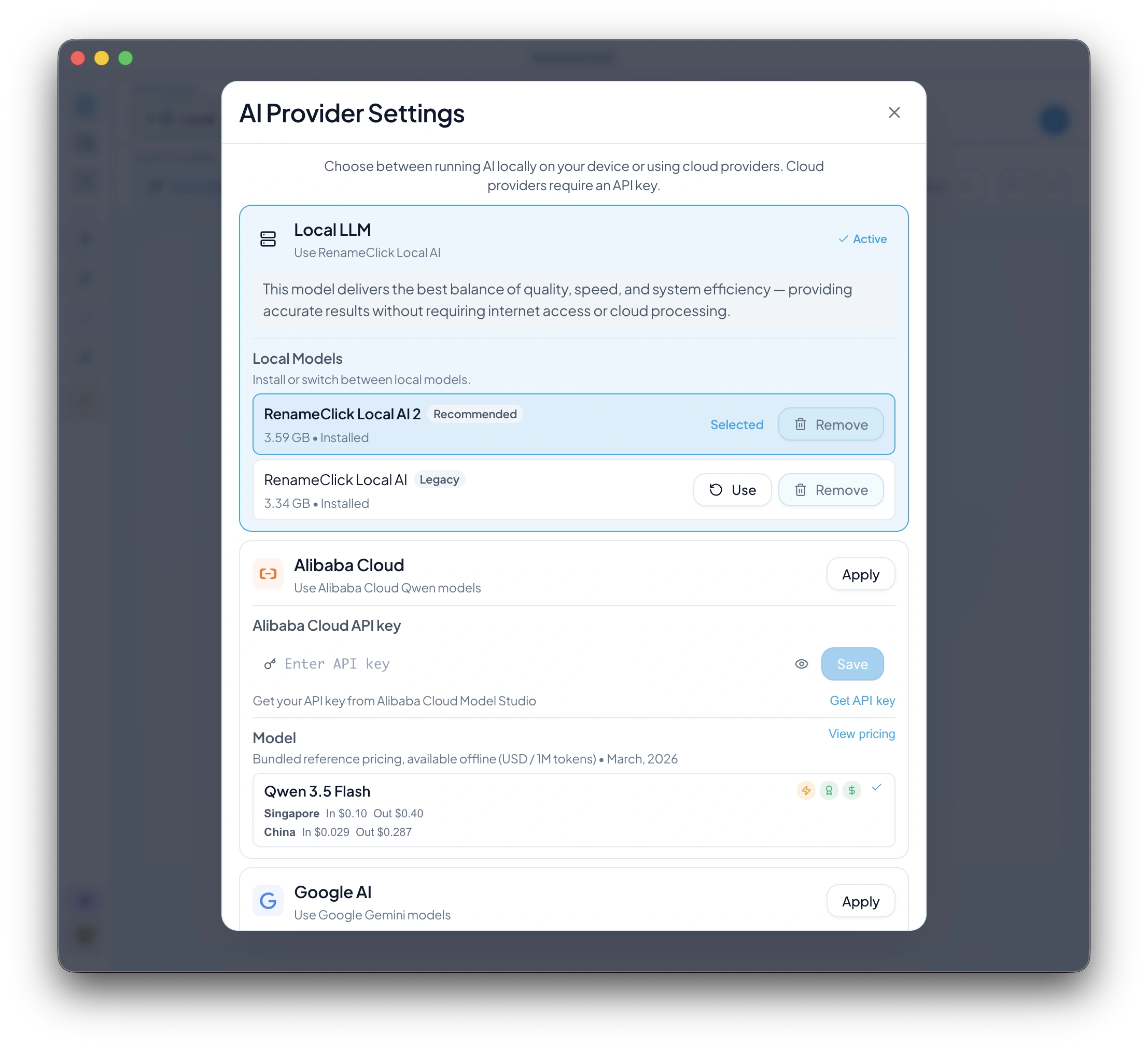
RenameClick Local AI 2 is now the recommended bundled local model.
This release updates the model used for image and document naming and categorization.
Existing users can upgrade from the legacy local model while keeping the older model available as a rollback option.
Learn more in Provider Settings.
Provider cards now handle Local, OpenAI, Google, Alibaba Cloud, LM Studio, and Ollama settings more consistently.
Model selections, pricing metadata, API-key states, and disabled states are clearer while processing is active.
Connection and timeout errors are classified more accurately, including ETIMEDOUT cases, so provider failures are easier to understand.
The bundled local AI runtime was updated for the new model.
Local model launch defaults were updated for file-processing prompts.
Model update handling was tightened so upgrades are safer across restarts and configuration changes.
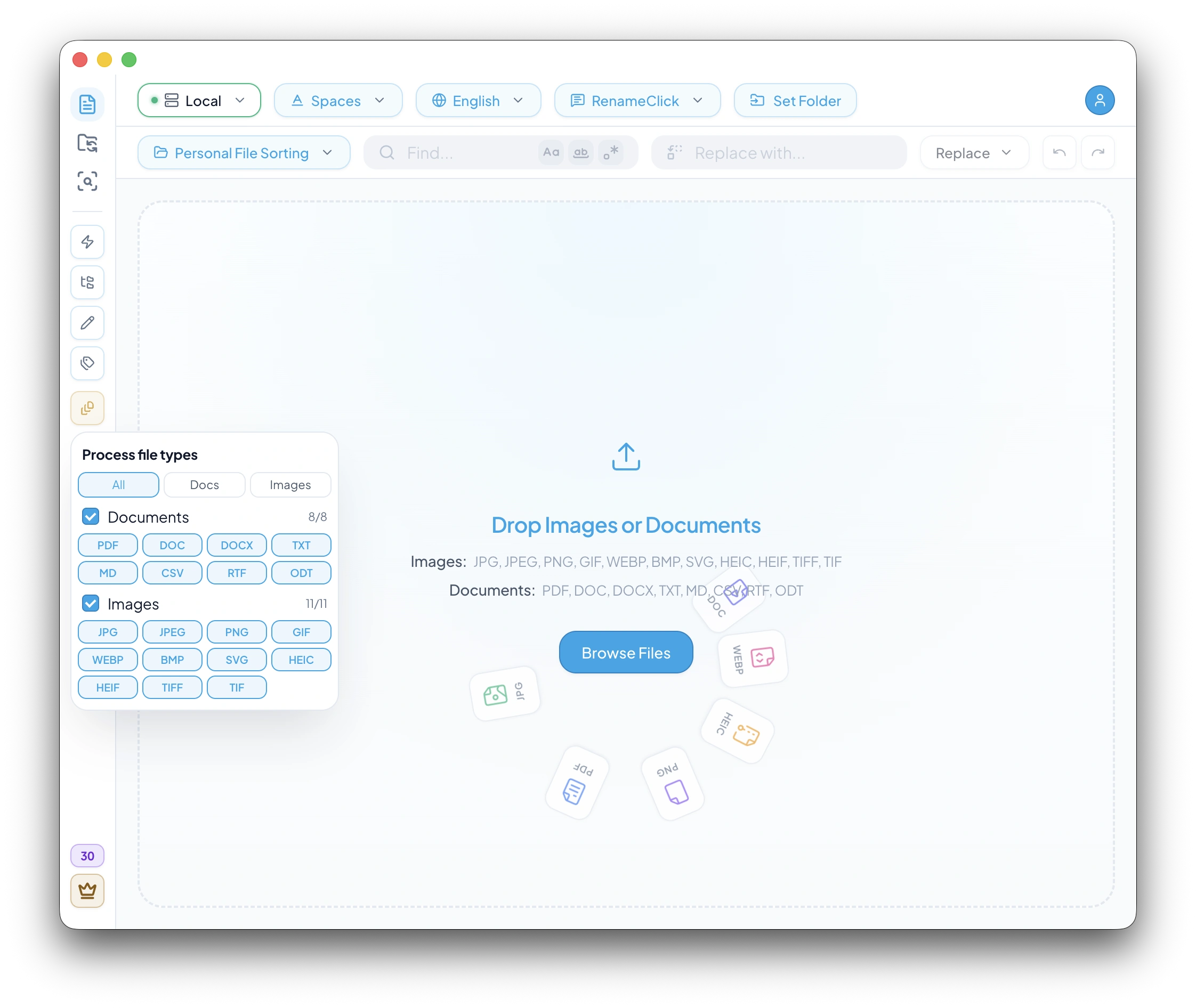
RenameClick now lets you choose which file types should be processed before files enter a workflow.
Use quick presets for All, Docs, or Images, or select exact extensions such as PDF, DOCX, PNG, JPG, CSV, TIFF, and more.
The same filtering model is available across Rename, AI Search, and Auto Flow so each workspace can stay focused on the files you actually want to process.
Learn more in Supported File Types.
File filters are applied at intake: file picker, folder scans, drag-and-drop, and watched Auto Flow folders.
If you choose documents only, images never enter the processing queue. If you choose PNG and PDF only, every other extension is ignored before processing starts.
This makes large mixed folders easier to work with and prevents accidental processing of unrelated files.
Functional controls such as auto-process, recursive scanning, rename/categorize toggles, and file type filters now live in the sidebar where they stay close to the active workspace.
The main toolbar is cleaner, with less visual noise around primary actions and search controls.
Auto Flow keeps the filter control next to its row actions, while Rename and AI Search expose their workflow controls directly in the sidebar.
Extension chips are more compact and easier to scan.
Credit count and the Pro action were moved into the lower sidebar area, with cleaner tooltips and a calmer premium accent.
The file filter button now uses icon-only toolbar styling, matching the rest of the compact workspace controls.
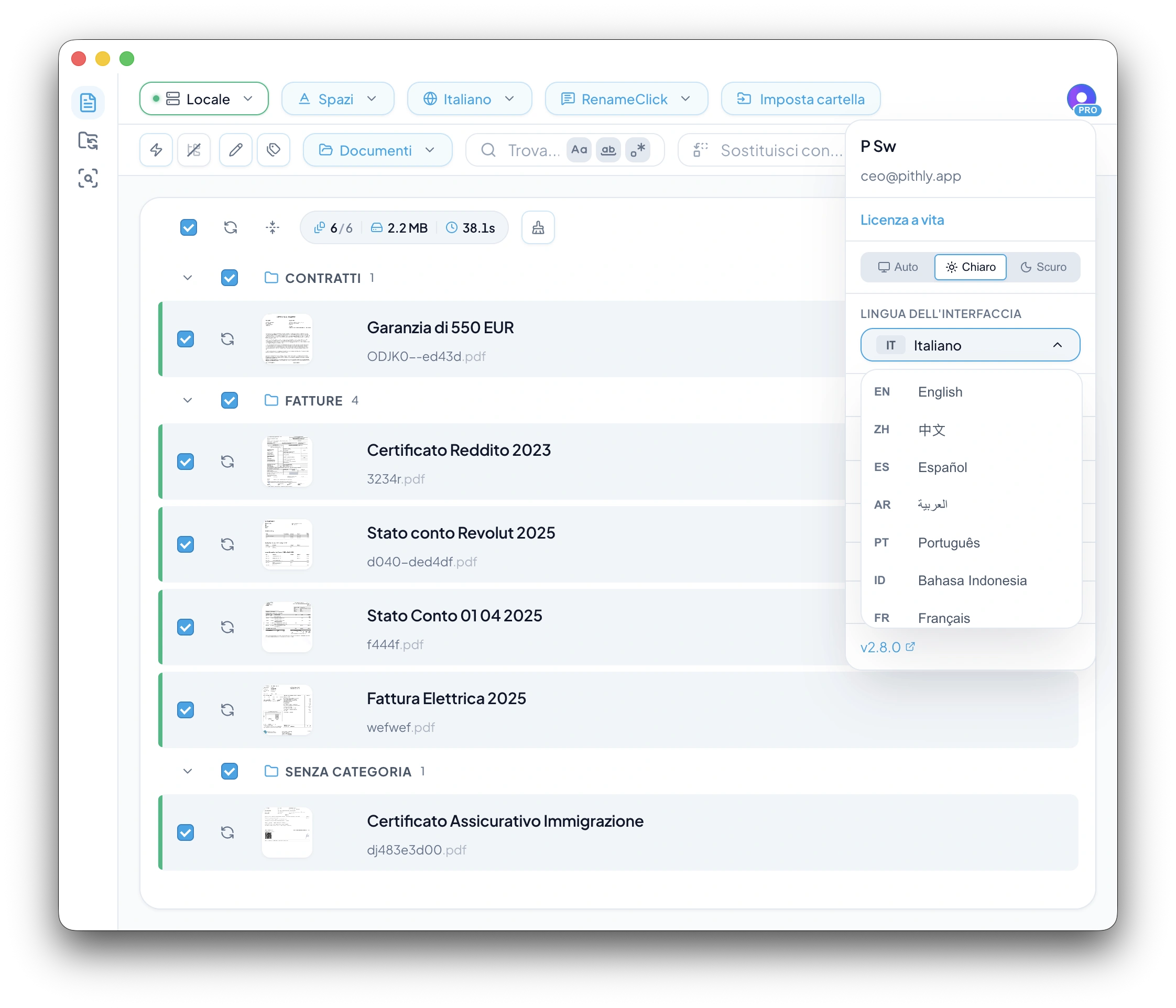
RenameClick now supports localized interface languages across the app: onboarding, settings, provider setup, result toolbars, tooltips, modals, and native desktop chrome.
The language selector is available during onboarding and later from the settings menu, with changes applied immediately.
The selector is built for a growing language list, so additional locales can be added without redesigning the settings UI.
Learn more in Settings.
Interface language controls the app UI only.
Output language still controls generated filenames and built-in category names used for destination folders.
This means you can use the app in Russian, German, Chinese, or another supported language while still generating English filenames and English folder names when your workflow requires it.
Toolbar layouts now adapt better to longer translated labels, with compact icon-first actions where space is limited.
Category preset labels, helper text, placeholders, native dialogs, menu labels, and tray actions were reviewed so the localized UI feels native instead of partially translated.
Built-in sorting presets now display category output consistently based on the selected output language.
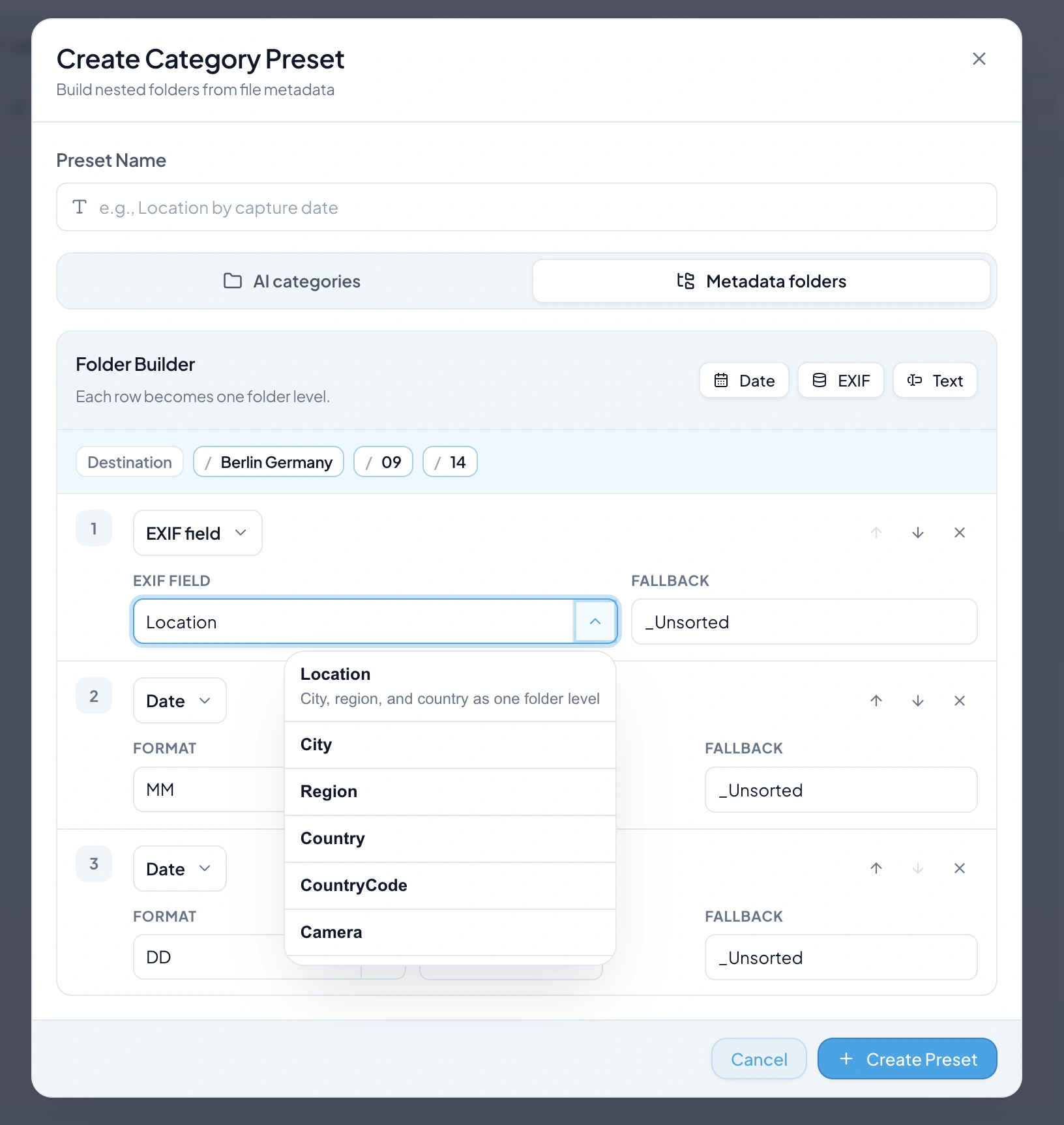
Create saved folder presets from date fields, EXIF fields, and fixed text levels.
Build any folder depth you need, such as Location / Year / Month / Day or Camera / Lens / Event.
Each level can use fallbacks, so files without a specific metadata value can still land in a predictable folder.
Learn more in Organize & Sort Files into Folders with AI.
Match folders scans the selected output folder and uses its existing top-level subfolders as the available categories.
AI then chooses the best existing folder for each file. This is useful when you are continuing work inside real project folders, client folders, or archive folders that already exist.
If no folder is a reasonable match, the file stays uncategorized and is applied to the output folder root.
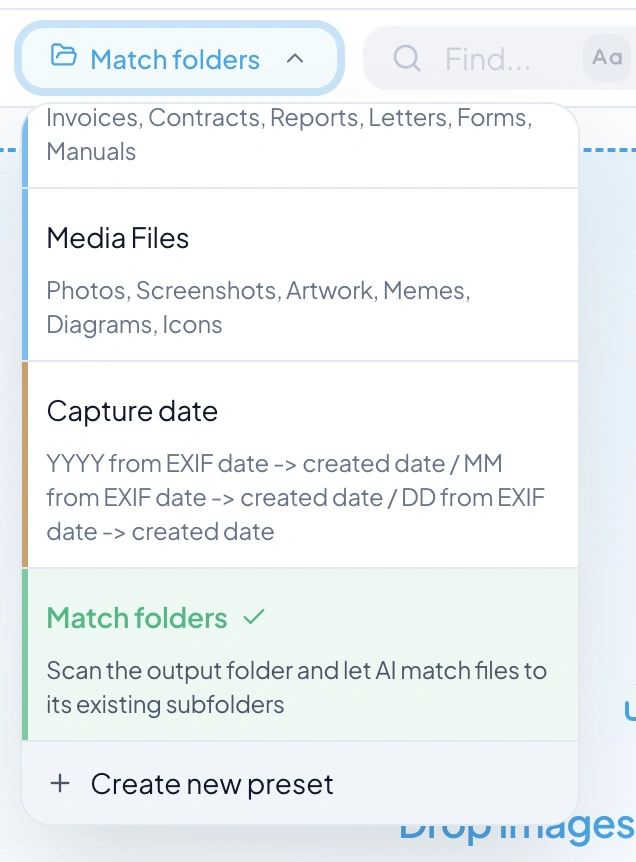
Sorting presets are now grouped and color-coded by type: AI categories, Metadata folders, and Match folders.
Built-in presets remain view-only, while custom AI and metadata presets can be saved and reused later.
The Folder Builder preview shows the final destination path before you process files, so complex metadata structures are easier to verify.
Right-click any file or folder and choose Rename with RenameClick to send it straight into the app for AI-powered renaming.
Works with single files, multiple files, folders, mixed selections, and even files with unicode or spaces in their names.
Learn more in Context Menu.
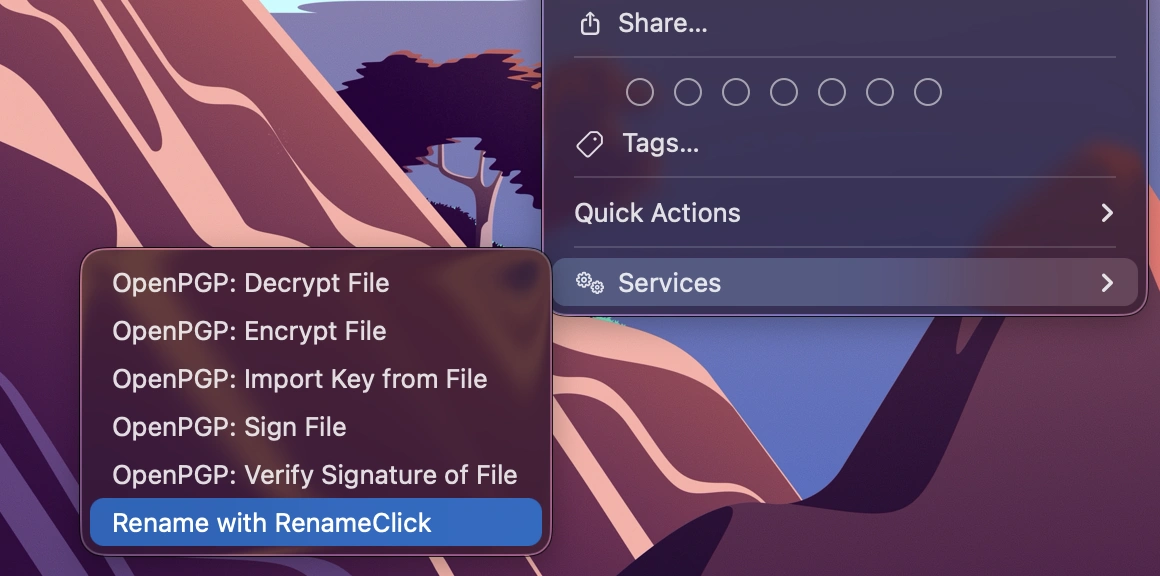
If RenameClick is already open, files are delivered instantly and the window activates.
If the app is minimized to the tray, it opens the window and processes files automatically.
If the app is not running at all, it launches, waits for the AI model to load, then processes your selection.
When you right-click a folder, RenameClick scans it recursively for all supported file types (images and documents).
Mixed selections of files and folders are supported — files are added directly, folders are scanned.
The context menu entry installs automatically on first app launch. No manual setup required.
On macOS, it appears under Quick Actions or Services in the Finder right-click menu.
On Windows, Rename with RenameClick appears directly in the File Explorer right-click menu for both files and folders. On Windows 11, look under Show more options to find it.
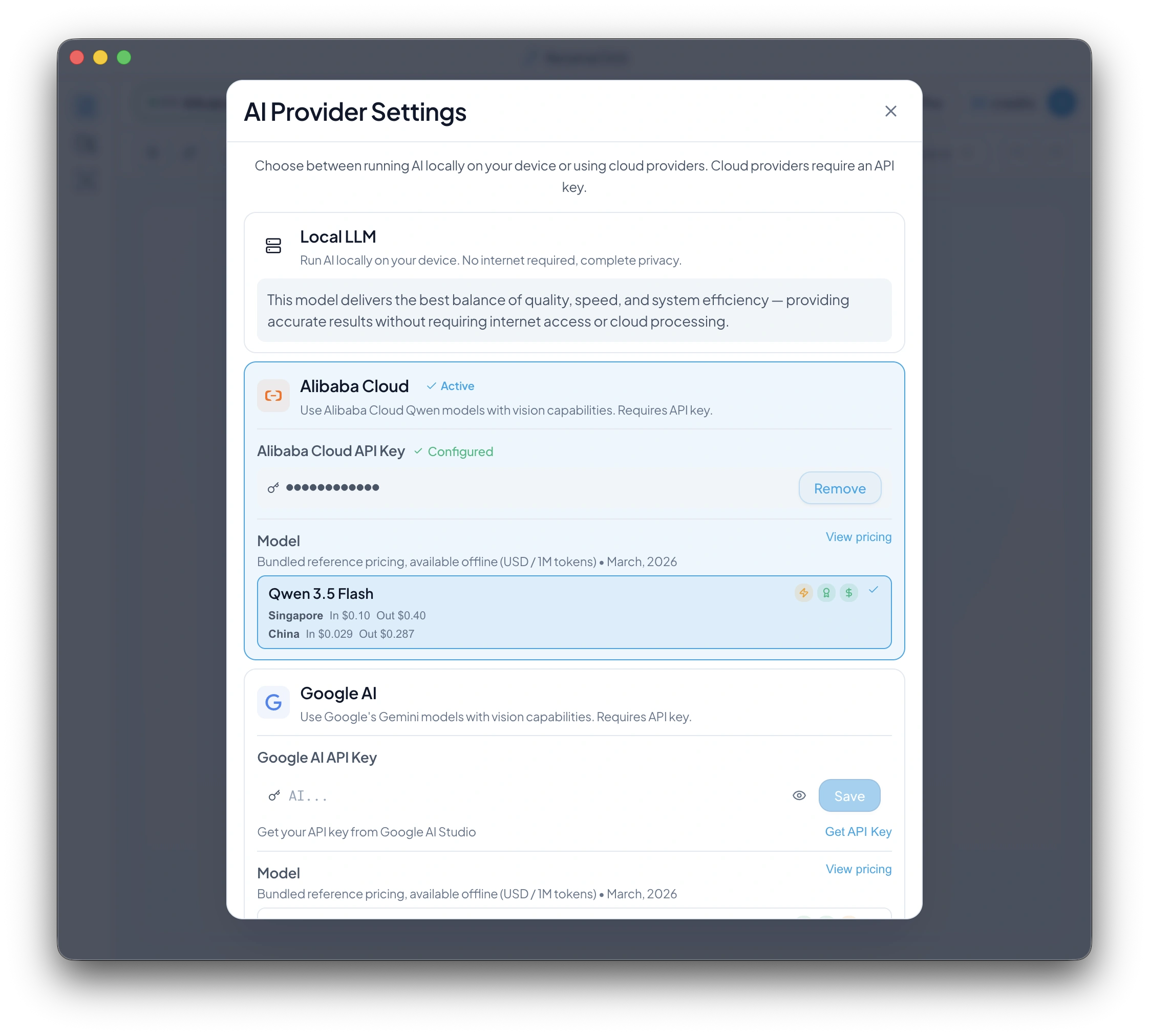
RenameClick now supports Alibaba Cloud as a cloud AI provider, powered by Qwen 3.5 Flash.
You can connect your Alibaba Cloud Model Studio API key and use Qwen directly inside RenameClick for fast AI-powered file renaming and categorization.
Learn more in Provider Settings.
Use Qwen 3.5 Flash as an alternative to OpenAI and Google AI.
Process both images and documents.
Switch to Alibaba Cloud from the existing provider selector in the app header.
Manage your Alibaba API key directly from Provider Settings.
Adds more provider flexibility for cloud AI workflows.
Gives you a regional choice between Singapore and China (Beijing).
Offers competitive bundled token pricing for large file-processing workloads, so you can balance speed, cost, and regional preferences.
Provider Settings now show bundled input/output token pricing directly in the model list for supported cloud providers, including Alibaba Cloud.
This gives you a quick cost reference before you start processing files.
1. Open Provider Settings.
2. Select Alibaba Cloud.
3. Add your Alibaba Cloud Model Studio API key.
4. Choose Qwen 3.5 Flash.
5. Start renaming files as usual.
Qwen 3.5 Flash is currently supported in Singapore and China (Beijing).
US (Virginia) Model Studio keys are not currently supported for this model.
RenameClick automatically uses the correct supported region for your Alibaba key.
Alibaba Cloud support fits into the same RenameClick workflow you already use.
There is no separate setup flow, no provider-specific screen, and no new processing mode to learn.
If you already use cloud providers in RenameClick, Alibaba Cloud works the same way.
Each automation row now has its own dedicated settings for naming format, AI instructions, output language, and categorization.
Learn more in Auto Flow.
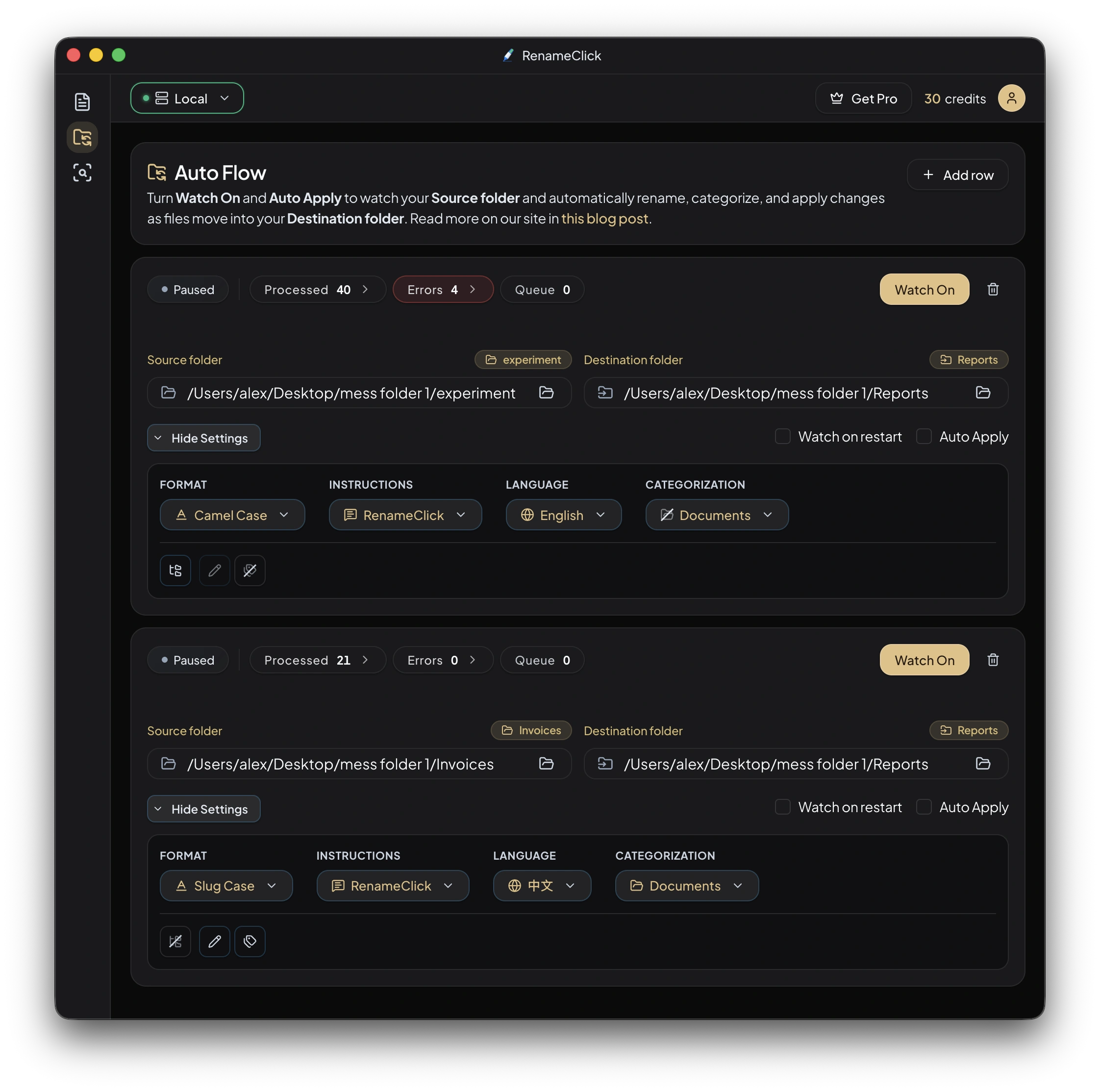
You can now export your entire configuration (custom formats, prompts, category presets etc.) to a `.rclick` file for backup or easy transfer between devices.
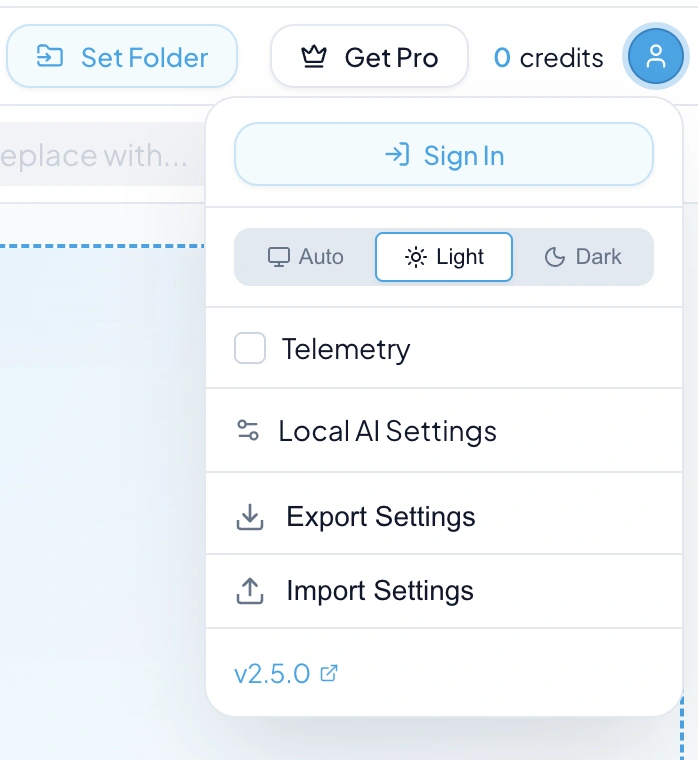
The scheduler now supports processing multiple Auto Flow folders simultaneously.
Global settings are no longer locked while Auto Flow is running. You can continue manual renaming tasks with any configuration while automated workflows run in the background.
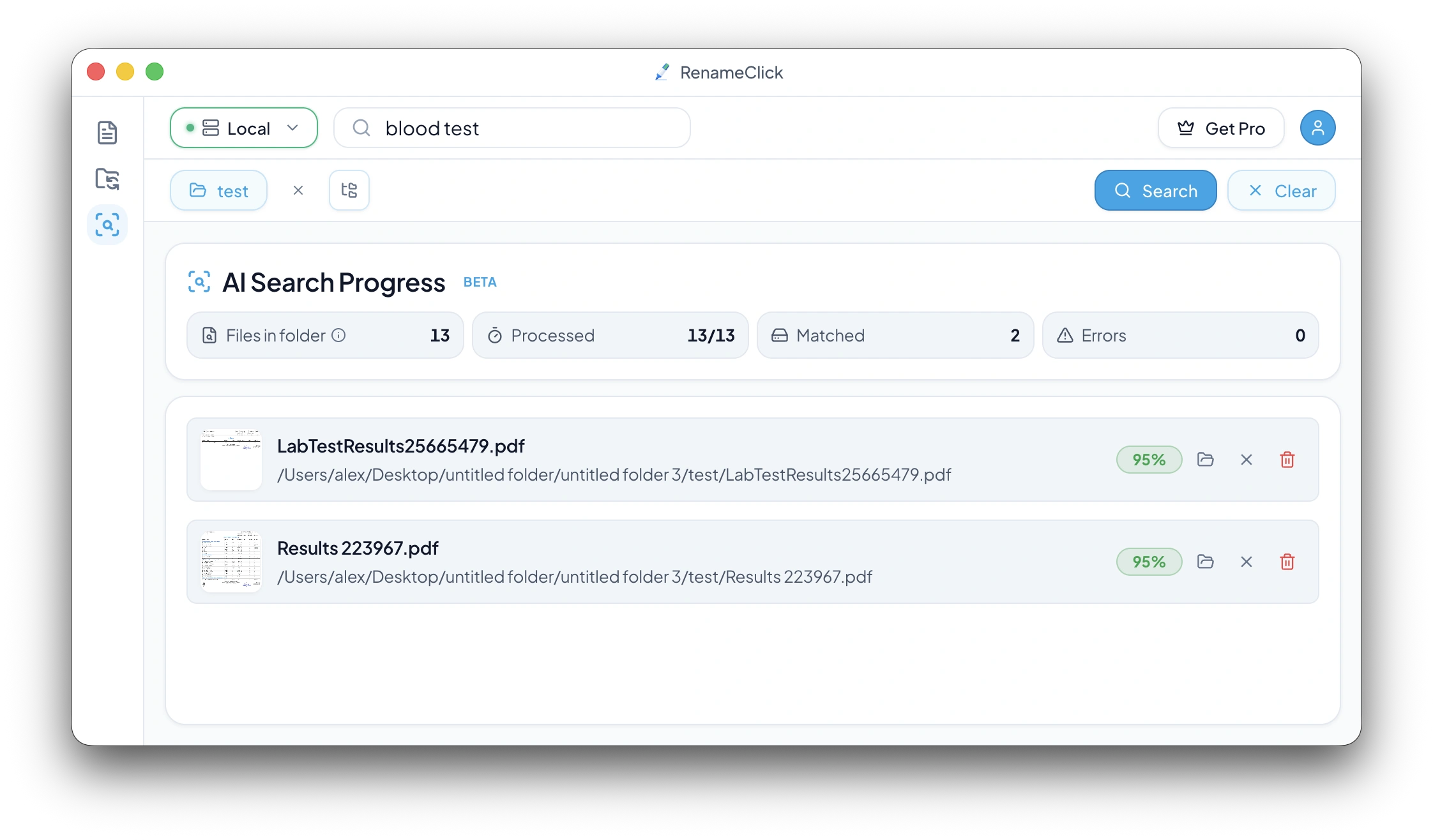
Use the new AI Search workspace to find files by intent (for example: "invoice from January", "blood test", "receipt from Amazon").
Pick a folder, enter your search term, and let AI match files by content across images and documents.
Search results are read-only by default, so you can safely discover files without renaming or moving anything.
Learn more in Search Files by Content and the content search solution.
Choose whether to scan only the selected folder or include nested subfolders with Recursive mode.
Track progress in real time with counters for Files in folder, Processed, Matched, and Errors.
When no matches are found yet, the workspace shows a live searching state while processing continues.
Matched files appear in a focused results list so you only review relevant items.
Per-file actions include Reveal in folder, Exclude from results, and Move to trash.
Search sessions are restored after restart, including term, selected folder, results, and progress counters.
While AI Search is running, Rename processing and Auto Flow watch start are locked to prevent conflicts.
Search start is also blocked when Rename or Auto Flow is already active, with clear reason tooltips in the UI.
AI Search is free to use — no credits are required for searching. Credits are used only when applying rename/move changes in other workflows.
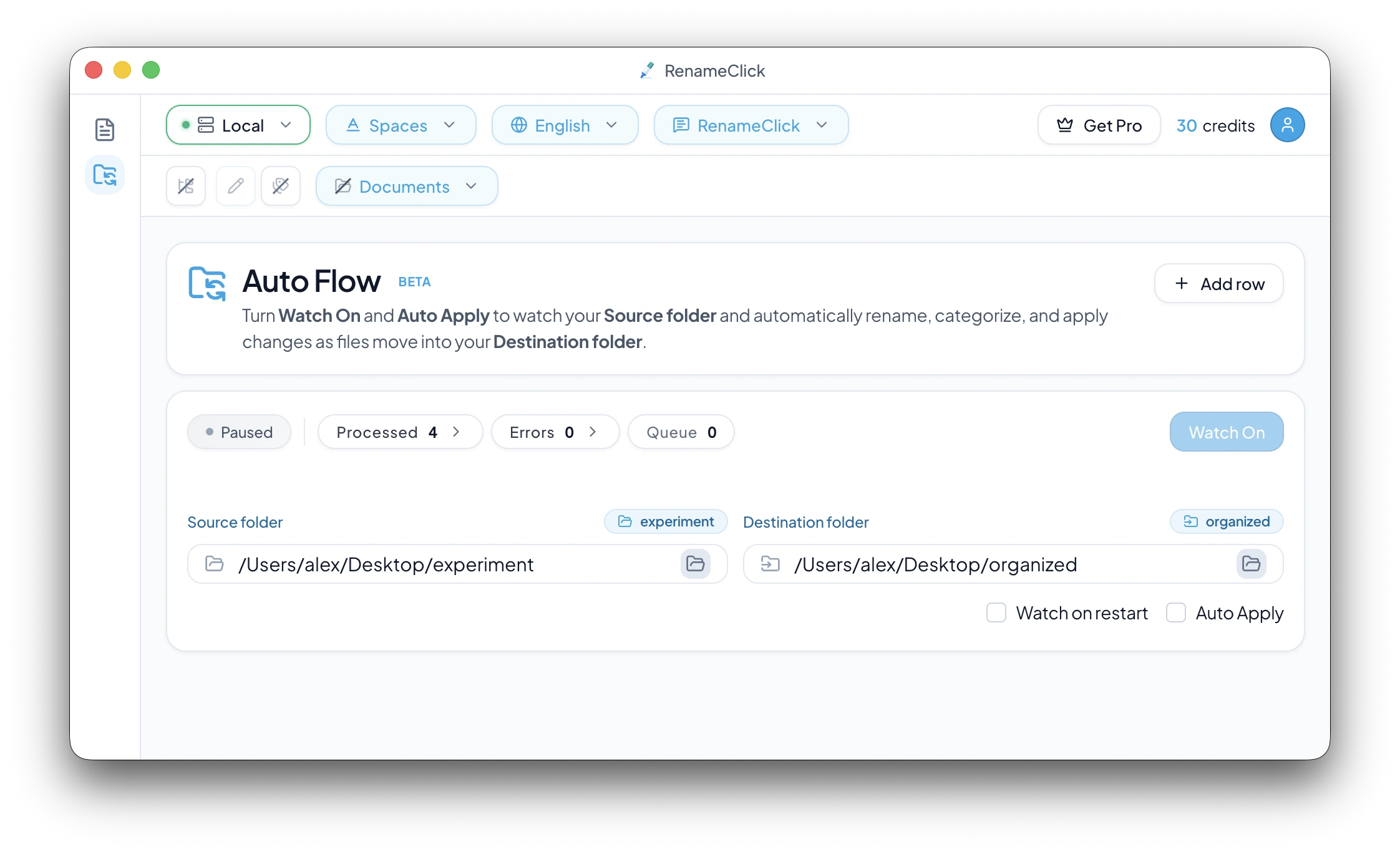
Auto Flow watches folders and processes incoming files using your naming and organization settings.
Set it up once, and watch as your files are automatically renamed, categorized, and moved to the right folders.
Auto Flow monitors folders you specify and automatically processes files as they appear.
Learn more in Auto Flow and Downloads Folder Organizer.
Watch Mode — Turn on Watch to start monitoring your source folder. When new files appear, they're automatically queued for processing.
Auto Apply ON — Files are processed and moved automatically — perfect for hands-off automation.
Auto Apply OFF — Files are processed but wait for your approval before moving — gives you full control to review AI suggestions.
Create multiple source-to-destination mappings: Downloads → Documents, Screenshots → Organized Photos, Scans → Categorized Invoices.
Custom Format Patterns — Use any naming format (spaces, slug-case, EXIF-based, custom patterns).
Custom Prompts — Apply specialized AI instructions for specific document types.
Category Presets — Automatically sort files into folders based on content.
Output Language — Generate filenames in your preferred language.
Processed Files — See files waiting for your approval (when Auto Apply is off).
Applied Files — Review all files that have been moved during Watch session.
Undo & Redo — Move files back to their original location or re-apply changes. Works for individual files or batch operations.
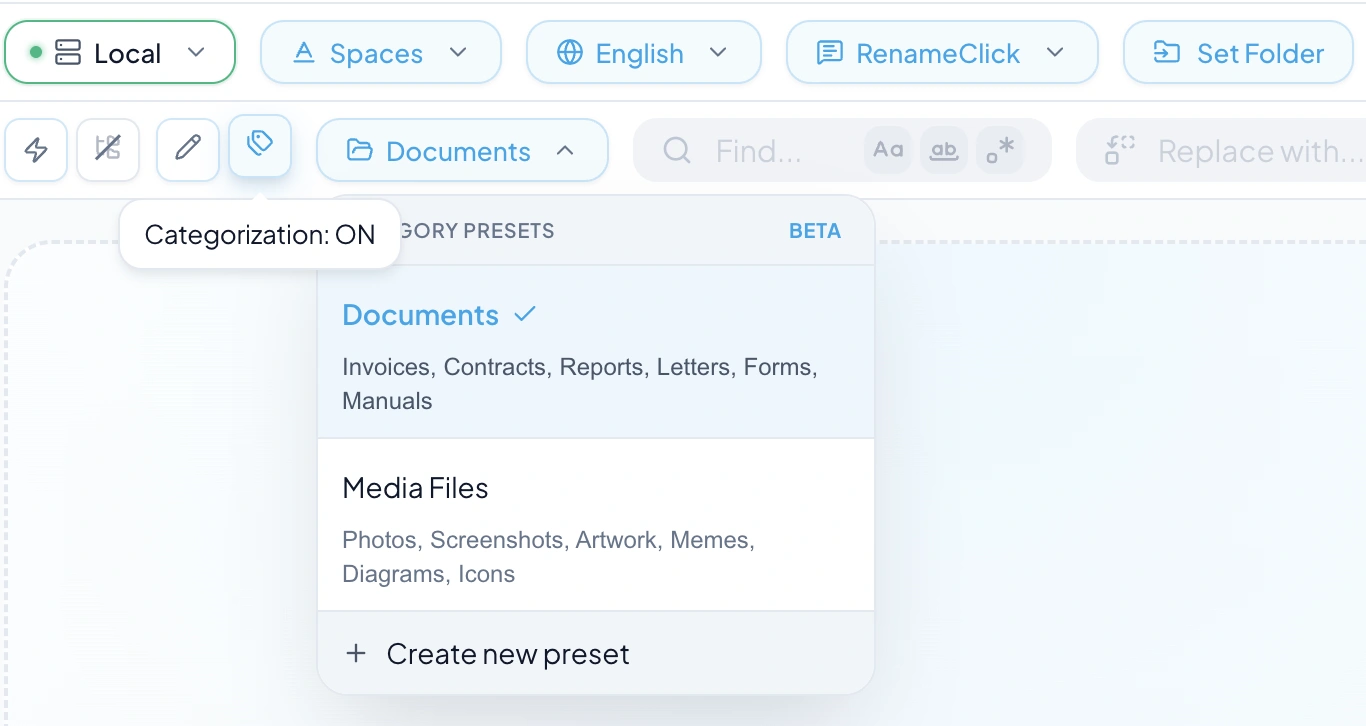
RenameClick can now sort your files into folders based on their content.
Switch to the Organizer tab, select a category preset, drop your files — the AI analyzes each file and assigns it to the best-matching category.
Built-in presets: Documents (Invoices, Contracts, Reports) and Media Files (Photos, Screenshots, Artwork, Memes).
Create custom presets with up to 8 categories — or expand to 20 with Local AI Settings.
Learn more in AI File Organizer.
Fine-tune the local AI engine to match your hardware and workflow.
Context Size — Token window for AI processing (affects memory usage)
Text Trim — Max characters extracted from documents
Custom Prompt Length — Character limit for custom instructions
Max Categories — Expand from 8 to 20 categories per preset
Includes a token calculator showing estimated usage for different scenarios.
Unlimited for free: Process files to see AI-generated names and categories, test custom instructions, tune local model settings.
Requires credits (30/month): Apply renames to files, move files to category folders.
Fully evaluate whether RenameClick fits your needs before subscribing.
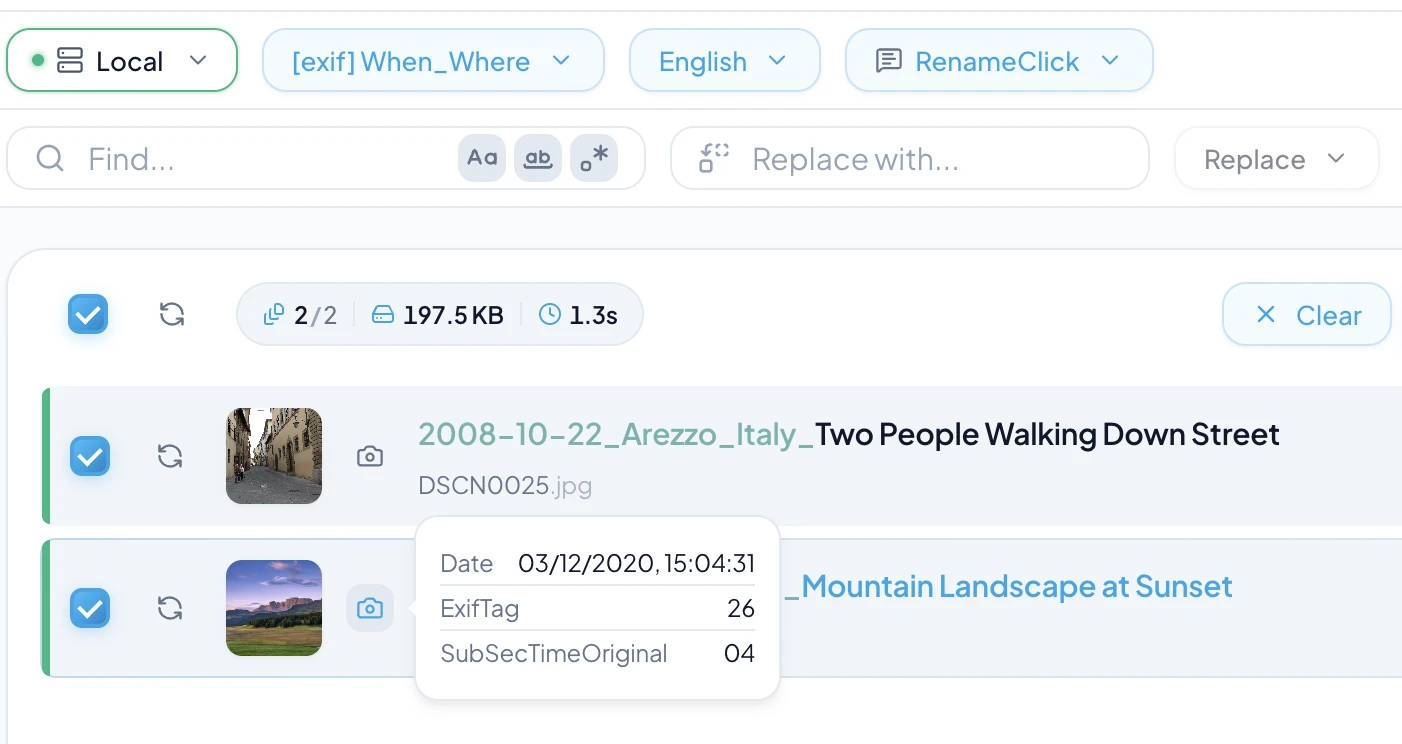
Use available photo metadata in filenames with EXIF format patterns.
Available placeholders:
• $exif{date} - Photo capture date (YYYY-MM-DD)
• $exif{camera} - Camera make and model
• $exif{city}, $exif{country}, $exif{location} - GPS location (requires location data in photo)
• $exif{iso}, $exif{aperture}, $exif{shutter} - Exposure settings
• $exif{FieldName} - Access any raw EXIF field (e.g., LensModel, Software, Artist)
Built-in preset: Use the "When_Where" format to automatically generate names like 2024-06-15_Paris_France.
View EXIF data: Hover over the camera icon on any photo to see all available metadata fields you can use.
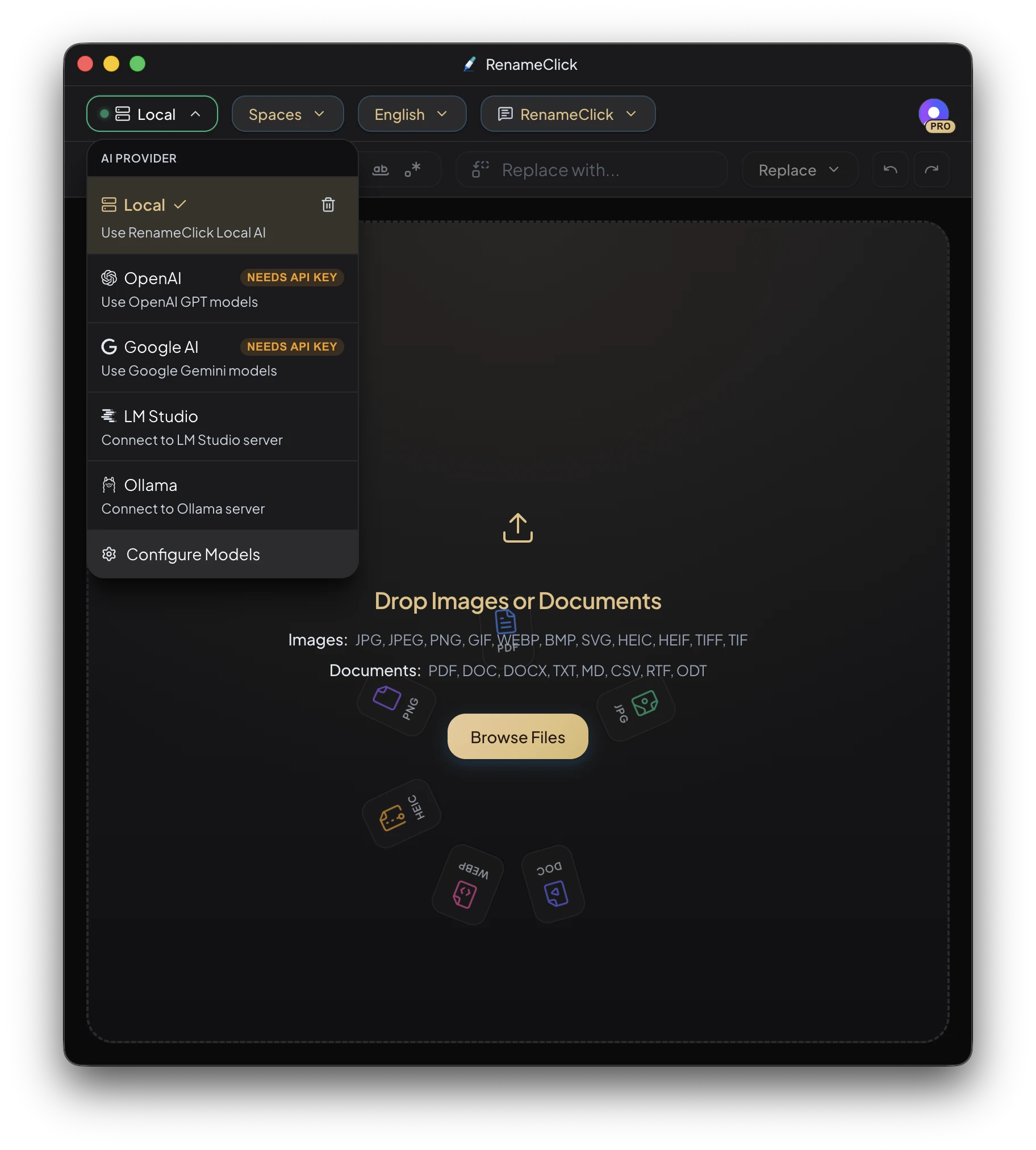
Dark Theme: RenameClick now has a dark mode. You can switch themes in the user menu.
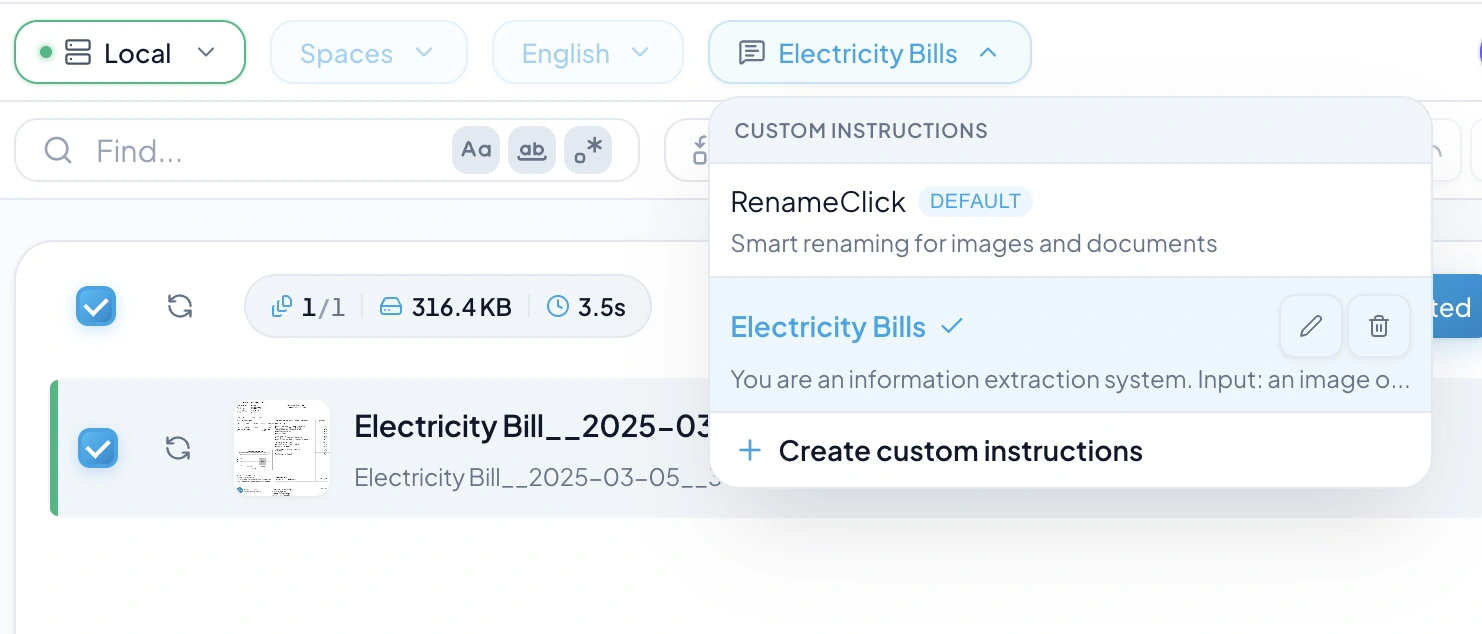
Take full control over how your files are renamed with custom AI instructions.
Use cases:
• Extract dates, amounts, and vendors from invoices
• Pull metadata like project codes or client names from contracts
• Create consistent naming for receipts, reports, or any document type
How to use:
1. Click the prompt selector in the header
2. Choose "Create custom instructions"
3. Write your extraction rules and output format
Note: When using Custom Instructions, the Format and Language selectors are disabled - your custom prompt has full control.
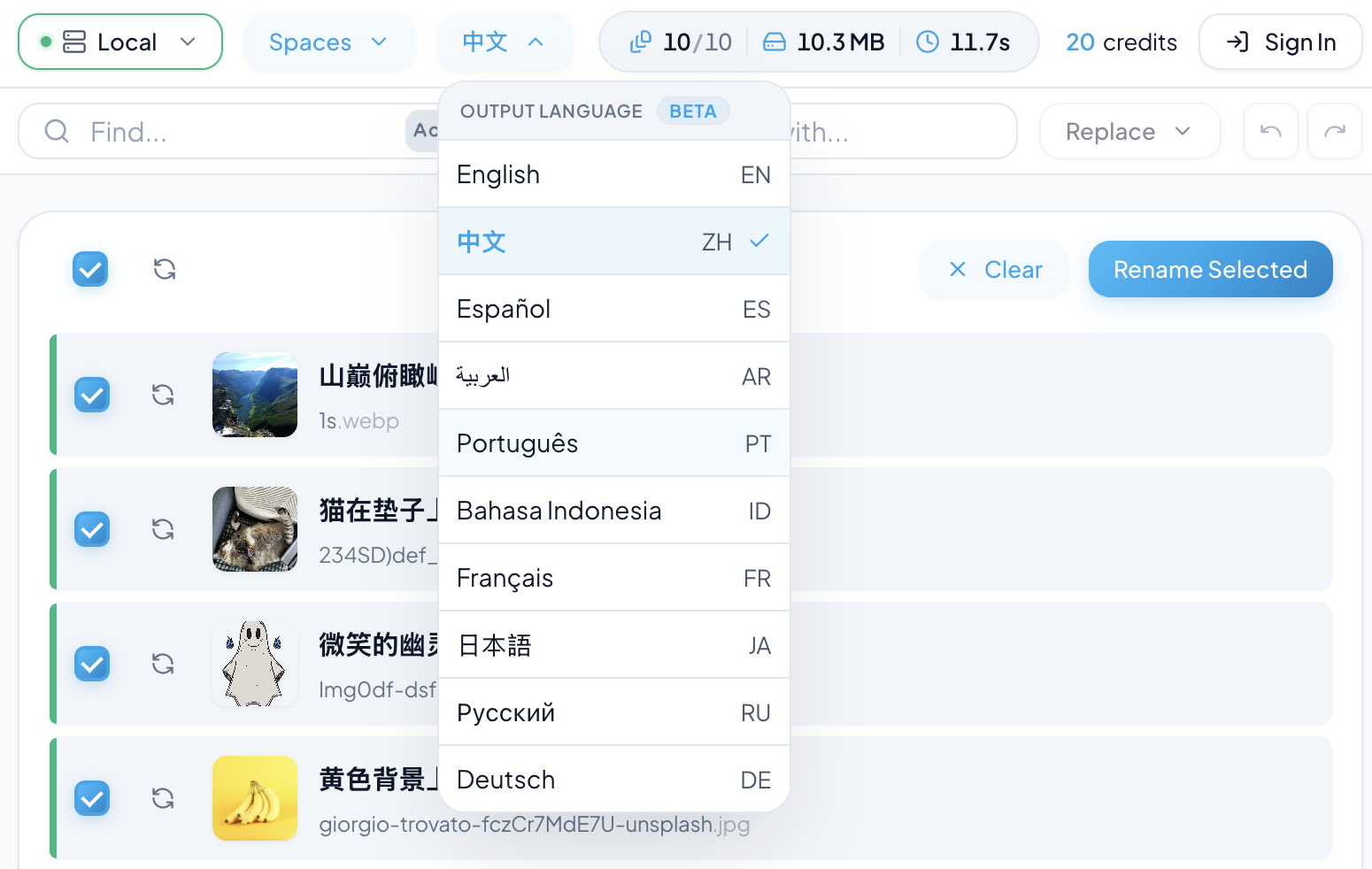
You can now choose the language used for generated filenames from the new Output Language dropdown in the header.
Supported output languages: English, 中文, Español, العربية, Português, Bahasa Indonesia, Français, 日本語, Русский, Deutsch.
The app sends this preference into the AI prompts so filenames are produced in your selected language, while keeping brand names/proper nouns (e.g., iPhone, YouTube) unchanged.
We also improved naming to sound more natural (not just keyword lists) and expanded character support so non-Latin filenames aren't stripped.
This feature is currently in Beta - if results look off for your language, contact support via the troubleshooting page.