Filename Format Patterns & Metadata
Create custom filename patterns with precise word selection, AI-generated and original names, counters, dates, EXIF, audio metadata, and text transformations in RenameClick.
Updated Applies to RenameClick 2.15.2
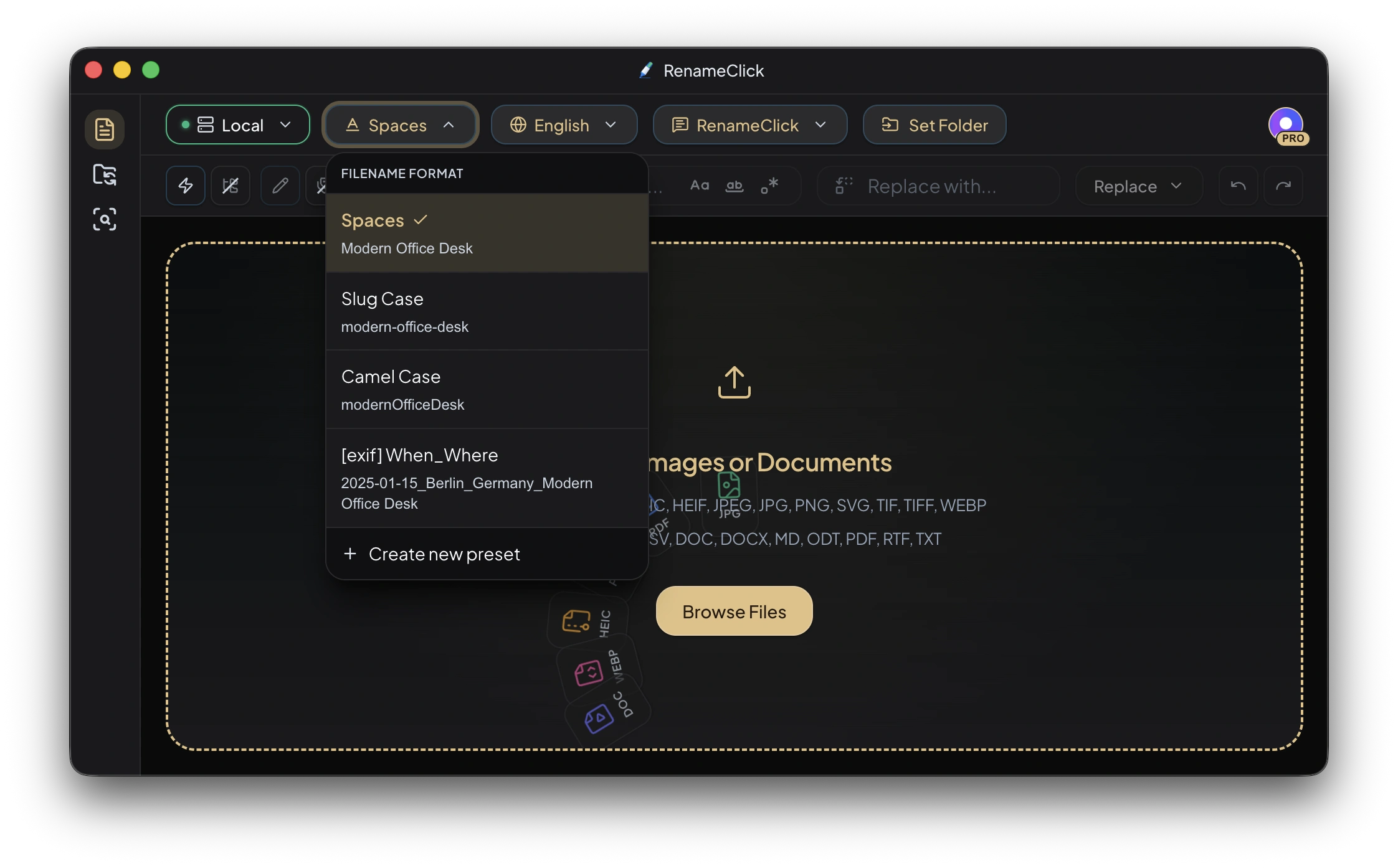
Use Format with the built-in RenameClick naming instructions to arrange the filename. Format and Output Language are disabled when Custom Instructions are selected; that prompt must define the complete name. You can combine AI-generated and original names, select exact words from either name, and add counters, file dates, image EXIF, audio metadata or transcript excerpts, and text transformations. File extensions are preserved automatically.
Common Tasks
- Keep the original ID and add a description:
$oldName_$1. - Use lowercase words with hyphens:
$slugcase{$1}.$lower{$1}changes case and keeps spaces. - Add a file creation date:
$date{YYYY-MM-DD}_$1. This is not a date extracted from a document. - Select the first two original-name words:
$words{old,1..2; join="_"}_$1.
The tables below illustrate syntax with stated sample names and metadata. They are not test results or a promise of the names the model will suggest.
Built-in Format Presets
| Preset | Example Output | Description |
|---|---|---|
| Spaces | Modern Office Desk.jpg | AI name as-is with spaces |
| Slug Case | modern-office-desk.jpg | Lowercase with hyphens |
| Camel Case | modernOfficeDesk.jpg | camelCase format |
| [exif] When_Where | 2024-12-07_Berlin_Modern Office Desk.jpg | EXIF date + location + AI name |
Custom Format Presets
You can create your own named format presets with custom patterns. Each preset stores a name, format pattern (using placeholders below), and optional description.
When you create a new format preset:
- The pattern editor validates syntax before saving
- A live preview shows what the output will look like
- The new preset is auto-selected immediately
Placeholders Reference
AI Name Placeholders
| Placeholder | What It Returns | Example |
|---|---|---|
$1 | Full AI-generated name | "Modern Office Desk" |
$2 | First word of AI name | "Modern" |
$3 | Second word | "Office" |
$4 | Third word | "Desk" |
$5+ | Additional words in order | (continues for each word) |
$oldName | Original filename (without extension) | "IMG_4521" |
$words{new,1} | First Unicode word of the AI-generated name | "Modern" |
$words{old,last} | Last Unicode word of the original filename | "4521" |
Flexible Word Selection with $words
Use $words{...} when you need an exact word, the last word, or an inclusive word range from either the AI-generated name or the original filename.
Both sources exclude the file extension:
| Source | Reads From | Equivalent Full-Name Placeholder |
|---|---|---|
new | AI-generated name | $1 |
old | Original filename | $oldName |
For the examples below, assume:
- AI name:
Modern, Office—Desk Lamp - Original file:
IMG_2024-final.v2.jpg(oldseesIMG_2024-final.v2)
Selectors
Word positions start at 1, and ranges include both their start and end.
| Selector | Meaning | Example Pattern | Output |
|---|---|---|---|
1, 2, ... | One word at that position | $words{new,1} | Modern |
last | Final word | $words{new,last} | Lamp |
2..4 | Words 2 through 4, inclusive | $words{new,2..4} | Office Desk Lamp |
2..last | Word 2 through the final word | $words{new,2..last} | Office Desk Lamp |
Indexes must be positive integers. Negative indexes and reverse ranges such as 4..2 are not supported.
Default Unicode Word Splitting
By default, a word is a continuous sequence of Unicode letters, combining marks, or numbers. Spaces, _, -, ., commas, dashes, apostrophes, emoji, and other punctuation act as separators. Repeated, leading, or trailing separators do not create empty words, and the original spelling and case are preserved.
That means Modern, Office—Desk Lamp is read as:
This works with non-English names and diacritics too. For example, Фото_été-2026.final becomes Фото, été, 2026, final. A continuous CJK name without spaces or punctuation is treated as one word.
Joining a Range
Ranges use one space between words by default. Add join="..." to choose another separator or remove it entirely.
| Pattern | Output |
|---|---|
$words{new,2..4} | Office Desk Lamp |
$words{new,2..4; join="-"} | Office-Desk-Lamp |
$words{new,2..4; join="_"} | Office_Desk_Lamp |
$words{new,2..4; join=""} | OfficeDeskLamp |
The join value must use double quotes. Inside it, \" inserts a quote and \\ inserts a backslash. A join option is valid with a single word, but has no visible effect because there is nothing to join.
Custom Separators with split
Use split=/.../flags when the default punctuation-aware splitting is not right for your naming convention. The regular expression describes separators, not the words themselves, and completely replaces the default rule.
For example, if only underscores should split IMG__2024-final.v2:
The hyphen and dot remain because /_+/u treats only underscores as separators. To explicitly split common filename punctuation, use:
Custom separator expressions use a deliberately safe regex subset:
- Only the
i(case-insensitive) andu(Unicode) flags are accepted, once each and in either order - Literals, character classes and ranges, standard escapes, Unicode property escapes with the
uflag, and sequences are supported - At most one atom may use
+,*, or?; the complete expression cannot match an empty string - The regex body is limited to 128 Unicode characters
- Groups, alternation, lookaround, backreferences, dot, anchors, word boundaries,
{m,n}quantifiers, and multiple quantified atoms are rejected
For example, $words{new,1..last; split=/x+/i; join="_"} changes OneXTwoxxThree into One_Two_Three.
The split and join options may appear in either order, but neither option can be repeated. Unknown options are rejected by the pattern editor.
More $words Examples
| Goal | Pattern | Output |
|---|---|---|
| First AI-name word | $words{new,1} | Modern |
| Last AI-name word | $words{new,last} | Lamp |
| AI-name words 2–4 | $words{new,2..4} | Office Desk Lamp |
| Everything after the first word | $words{new,2..last; join="-"} | Office-Desk-Lamp |
| First part of the original name | $words{old,1} | IMG |
Drop the original IMG prefix | $words{old,2..last; join="_"} | 2024_final_v2 |
| Join the entire AI name without separators | $words{new,1..last; join=""} | ModernOfficeDeskLamp |
| Uppercase an original-name word | $upper{$words{old,1}} | IMG |
| Create a slug from part of the AI name | $slugcase{$words{new,2..last}} | office-desk-lamp |
$words{...} can be nested inside every text transformation. The selected text is treated as filename data, so text such as $1 inside an actual filename is not interpreted as another placeholder.
Missing Words and Compatibility
- A missing single index,
laston an empty source, or a range whose starting word does not exist returns an empty string - If a range end is beyond the available words, it is clipped to the final word:
$words{new,2..99}returns words 2 through the end - Invalid
$wordssyntax is caught by the pattern editor before the preset can be saved $words,new,old,last,split, andjoinare case-sensitive- Existing
$2,$3, and later numbered placeholders still split only on whitespace, so existing presets keep their previous behavior. Use$words{...}for punctuation-aware Unicode selection
Auto Increment Placeholders
Use auto increment when you want AI-generated names to stay sortable in Finder or File Explorer.
$successIndex is usually the best choice. It increments only for files that completed successfully, so files with errors, pending or cancelled rows, and rows removed from the list are skipped by the $successIndex counter. The applied filenames keep a gap-free sequence.
| Placeholder | What It Returns | Example |
|---|---|---|
$successIndex | Auto-increment number for successful files, starting at 1 | "1", "2", "3" |
$successIndex{01} | Auto-increment number with two digits | "01", "02", "03" |
$successIndex{001} | Auto-increment number with three digits | "001", "002", "003" |
$successIndex{3} | Auto-increment number starting at 3 | "3", "4", "5" |
$index{01} | Original batch/workspace order with two digits | "01", "02", "03" |
The number inside {} controls both the starting value and the padding width. For example, $successIndex{00001} starts at 00001, while $successIndex{3} starts at 3 without extra padding.
Use $index only when you need the original batch order. It can have gaps if files are removed, filtered, or fail before apply.
Text Transformations
| Transformation | Input → Output | Description |
|---|---|---|
$upper{$1} | "Modern Office Desk" → "MODERN OFFICE DESK" | All uppercase |
$lower{$1} | "Modern Office Desk" → "modern office desk" | All lowercase |
$capitalize{$1} | "modern office desk" → "Modern office desk" | Capitalize first letter only |
$slugcase{$1} | "Modern Office Desk" → "modern-office-desk" | Lowercase with hyphens |
Transformations can be nested with any placeholder: $upper{$2} → "MODERN", $lower{$1} → "modern office desk".
File Date Placeholders
| Placeholder | Description | Example Output |
|---|---|---|
$date{YYYY-MM-DD} | File creation date | "2024-12-07" |
$date{DD_MM_YYYY} | Alternative date format | "07_12_2024" |
$date{YYYYMMDD} | Compact date | "20241207" |
$date{YYYYMMDD,modified} | File modification date | "20241207" |
By default, $date{} uses the file creation date. Add ,modified to use the modification date instead.
EXIF Placeholders (Images Only)
EXIF metadata is embedded in photos by cameras and smartphones. These placeholders only work with image files that contain EXIF data.
Date/Time from EXIF
| Placeholder | Description | Example |
|---|---|---|
$exif{date} | Capture date (YYYY-MM-DD) | "2024-12-07" |
$exif{date,YYYYMMDD} | Custom date format | "20241207" |
$exif{date,DD-MM-YYYY} | European date format | "07-12-2024" |
$exif{time} | Capture time (HH-mm-ss) | "14-30-45" |
$exif{time,HHmm} | Short time format | "1430" |
$exif{datetime} | Full date + time | "2024-12-07_14-30-45" |
Camera Information
| Placeholder | Description | Example |
|---|---|---|
$exif{camera} | Make + Model combined | "Canon_EOS_R5" |
$exif{make} | Camera manufacturer | "Canon" |
$exif{model} | Camera model name | "EOS R5" |
$exif{iso} | ISO sensitivity | "400" |
$exif{aperture} | Aperture value | "f2.8" |
$exif{shutter} | Shutter speed | "1_250" |
GPS Location
| Placeholder | Description | Example |
|---|---|---|
$exif{country} | Country name (from GPS) | "Germany" |
$exif{city} | City name (from GPS) | "Berlin" |
$exif{region} | State or region | "Bavaria" |
$exif{location} | City + Country combined | "Berlin_Germany" |
$exif{gps} | Raw GPS coordinates | "52.5200_13.4050" |
Generic EXIF Access
You can access any EXIF field by its name:
| Placeholder | Example Output |
|---|---|
$exif{Software} | "Adobe Photoshop" |
$exif{LensModel} | "EF 50mm f/1.4" |
$exif{Artist} | "John Doe" |
$exif{Copyright} | "© 2024 Photographer" |
Audio Placeholders (Audio Only)
Supported audio files are transcribed and named through AI. The generated smart name remains available as $1; $audio{...} placeholders let you combine that name with embedded tags, technical metadata, or a short local transcript excerpt.
Common Audio Tags
| Placeholder | What It Returns |
|---|---|
$audio{title} | Embedded track or recording title |
$audio{artist} | Primary artist |
$audio{album} | Album name |
$audio{track} | Track number |
$audio{year} | Embedded year |
$audio{genre} | Genre or genres |
$audio{language} | Language from embedded metadata |
Technical Audio Metadata
| Placeholder | What It Returns |
|---|---|
$audio{duration} | Duration as MM-SS or HH-MM-SS |
$audio{codec} | Audio codec |
$audio{container} | Container format |
$audio{bitrate} | Bitrate |
$audio{samplerate} | Sample rate |
$audio{channels} | Channel count |
$audio{lossless} | Whether the audio is lossless |
Transcript Excerpts
| Placeholder | What It Returns |
|---|---|
$audio{transcript} | First 80 grapheme clusters of the local transcript |
$audio{transcript,160} | Custom excerpt length, capped at 200 |
If an audio value is unavailable, the placeholder returns UNKNOWN.
Complete Pattern Examples
These examples assume the sample names and metadata shown in the relevant reference sections. A missing EXIF field is empty; a missing audio field returns UNKNOWN. Do not infer a value from an example table.
| Pattern | Example Output | Use Case |
|---|---|---|
$1 | "Modern Office Desk.jpg" | Default AI name |
$exif{date,YYYYMMDD}_$1 | "20241207_Modern Office Desk.jpg" | Photo with date prefix |
$exif{camera}_$1 | "Canon_EOS_R5_Modern Office Desk.jpg" | Photo with camera info |
$exif{city}_$exif{country}_$1 | "Berlin_Germany_Modern Office Desk.jpg" | Photo with location |
$date{YYYY-MM-DD}_$1 | "2024-12-07_Modern Office Desk.jpg" | File date prefix |
$upper{$2}_$lower{$3} | "MODERN_office.jpg" | Mixed case words |
$oldName_$1 | "IMG_4521_Modern Office Desk.jpg" | Keep original + add AI name |
$words{new,1}_$words{new,last} | "Modern_Lamp.jpg" | Keep only the first and last AI-name words |
$words{new,2..last; join="-"} | "Office-Desk-Lamp.jpg" | Drop the first AI-name word and join the rest |
$words{old,2..last; join="_"} | "2024_final_v2.jpg" | Drop a prefix from the original filename |
$slugcase{$words{new,2..last}} | "office-desk-lamp.jpg" | Create a slug from a selected range |
$successIndex{01}_$1 | "01_Modern Office Desk.jpg" | Two-digit auto-increment sequence for successful results |
$successIndex{001}_$1 | "001_Modern Office Desk.jpg" | Three-digit auto-increment sequence |
$successIndex{3}_$1 | "3_Modern Office Desk.jpg" | Auto-increment sequence starting from 3 |
$index{01}_$1 | "01_Modern Office Desk.jpg" | Original batch order + AI name |
$audio{artist}_$audio{title} | "David Bowie_Heroes.mp3" | Embedded artist and title |
$audio{album}_$audio{track}_$1 | "Heroes_3_Live Performance.mp3" | Album metadata + AI-generated name |
$audio{transcript,160}_$1 | "School project discussion_Project Discussion.m4a" | Speech excerpt + AI-generated name |
Date/Time Tokens
These tokens work inside both $date{} and $exif{date,...} / $exif{time,...}:
| Token | Description | Example |
|---|---|---|
YYYY | 4-digit year | 2024 |
YY | 2-digit year | 24 |
MM | Month (zero-padded) | 07 |
DD | Day (zero-padded) | 03 |
HH | Hour, 24h (zero-padded) | 09 |
mm | Minute (zero-padded) | 05 |
ss | Second (zero-padded) | 07 |
Allowed separators in date/time formats: - and _ (dots are not allowed)
Tips
- EXIF fields are image-only: Using
$exif{}on a PDF or text file will produce empty values - Audio fields are audio-only:
$audio{}reads normalized audio metadata or the local transcript; missing values returnUNKNOWN - Audio remains AI-powered: Metadata changes the final format only; the smart
$1name still comes from the speech transcript - Missing EXIF data: If an image lacks certain EXIF fields (e.g., no GPS), those placeholders are silently omitted
- $date vs $exif date:
$date{}uses filesystem dates (works on all files);$exif{date}uses the camera's capture date - Auto increment:
$successIndexcounts only successful results; failed, pending, cancelled, and removed rows are skipped by this counter - Batch index:
$indexfollows the original workspace order and can have gaps after filtering or deletion - Legacy words vs
$words:$2,$3, and later placeholders split only on whitespace;$words{...}also recognizes punctuation and Unicode separators - Missing word selections: An unavailable word returns an empty value, while an oversized range end is clipped to the final available word
- Test with preview: The format editor shows a live preview so you can verify your pattern before saving