
Blogimage file names seo

Image File Names for SEO: How Descriptive Names Improve Rankings

Why image file names matter for search engines, how to write SEO-friendly names, and how RenameClick generates descriptive names from image content.

Published: Feb 07, 20268 min read

Search engines can't "see" images the way humans do. They rely on file names, alt text, and surrounding context to understand what an image shows. A file called modern-home-office-desk-setup.jpg gives Google clear signals about the content. A file called IMG_4829.jpg gives it nothing.

If you run a blog, e-commerce store, portfolio, or any website with images, descriptive file names are one of the easiest SEO wins available. This guide explains why image file names matter for search rankings and how RenameClick can generate SEO-friendly names from image content automatically.

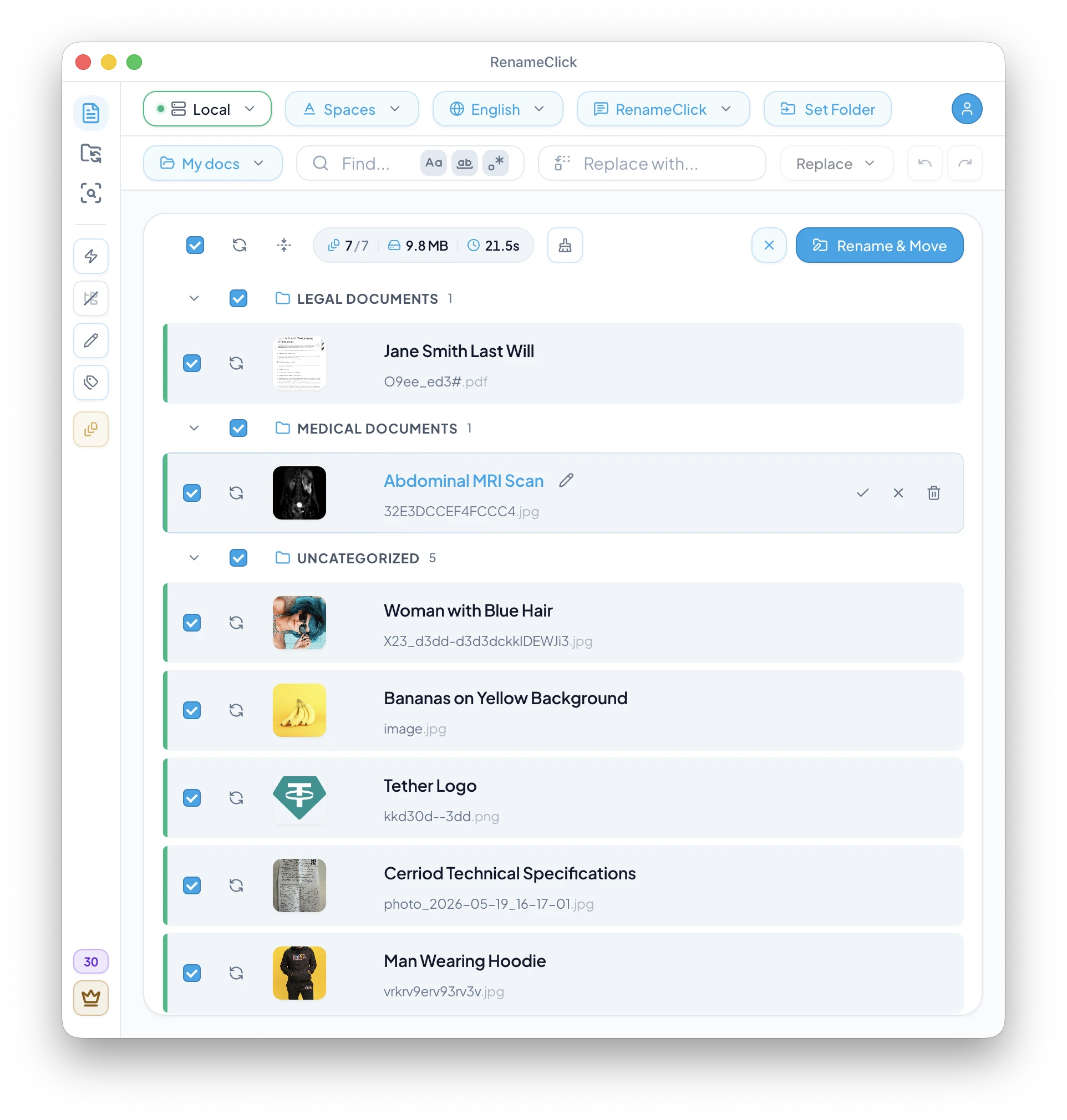
RenameClick generating SEO-friendly image file names
RenameClick analyzes image content and generates descriptive, SEO-ready file names.

Key takeaways

  • Image file names are a confirmed Google ranking factor for image search.
  • Use descriptive, keyword-rich names with hyphens as separators.
  • Rename images before uploading — CMS platforms often keep the original name in the URL.
  • AI tools can generate accurate descriptive names at scale, saving hours of manual work.

Why image file names matter for SEO

Google's own image SEO documentation explicitly states: "The filename can give Google clues about the subject matter of the image." This means that before Google even looks at your alt text or page content, it's already parsing the file name for signals.

Image search drives significant traffic — especially for visual industries like travel, food, fashion, interior design, and e-commerce. A well-named image can appear in Google Images, Google Lens results, and even regular web search when the image pack shows up.

And it's not just Google. Pinterest, Bing, and social platforms also use file names as metadata when images are shared or re-uploaded.

How Google reads image file names

When Googlebot crawls a page and encounters an image, it processes several signals:

  1. File name — the URL path including the image name.
  2. Alt text — the alt attribute in the HTML.
  3. Surrounding text — captions, headings, and nearby paragraphs.
  4. Page title and URL — the broader context of the page.
  5. Structured data — schema markup for products, recipes, etc.

The file name is the first and most persistent signal. Even if the image gets re-shared without alt text, the file name travels with it in the URL. A name like red-leather-laptop-bag-front-view.jpg continues to provide context wherever the image appears.

Best practices for SEO-friendly image names

  • Be descriptive and specificblue-ceramic-coffee-mug-on-wooden-table.jpg beats mug.jpg or product-1.jpg.
  • Use hyphens as separators — Google treats hyphens as word separators. Underscores are joined (coffee_mug is read as one word). Spaces become %20 in URLs.
  • Use lowercase — avoids duplicate URL issues on case-sensitive servers.
  • Include target keywords naturally — if the page targets "leather laptop bag," use that phrase in the image name. Don't keyword-stuff.
  • Keep it concise — 3–8 words is ideal. Extremely long names get truncated in search results.
  • Use the right format — WebP for web images (smaller files, faster loading), JPEG for photos, PNG for graphics with transparency.

Common image naming mistakes that hurt SEO

  • Camera defaultsIMG_4829.jpg, DSC_0042.jpg, Screenshot 2025-01-15.png. Zero SEO value.
  • Generic namesimage1.jpg, photo.png, banner.webp. Tells search engines nothing.
  • Keyword stuffingbest-cheap-leather-bag-buy-now-sale-discount.jpg. This looks spammy and may hurt rankings.
  • Underscores instead of hyphenscoffee_mug.jpg is read as "coffeemug" by Google. Use coffee-mug.jpg.
  • Renaming after upload — many CMS platforms (WordPress, Shopify) keep the original file name in the URL even if you change the title later. Rename before uploading.

Image naming for e-commerce products

For product images, include the product name, key attribute (color, size, material), and view angle when relevant:

  • brown-leather-messenger-bag-front.jpg
  • brown-leather-messenger-bag-side-pocket-detail.jpg
  • wireless-bluetooth-headphones-black-on-ear.jpg

This naming pattern aligns with how people search ("brown leather messenger bag") and helps your product images rank in Google Shopping and image search results.

Image naming for blogs and portfolios

Blog images should describe the visual content and relate to the article's topic:

  • home-office-setup-standing-desk-dual-monitors.jpg (for a productivity article)
  • sourdough-bread-scoring-pattern-close-up.jpg (for a baking tutorial)
  • tokyo-shibuya-crossing-night-rain.jpg (for a travel post)

For portfolio sites (photographers, designers), descriptive names also help potential clients find your work through image search — a major discovery channel for visual professionals.

AI-powered SEO image naming with RenameClick

Manually writing descriptive names for hundreds of product photos or blog images is tedious. RenameClick automates this by analyzing the actual visual content of each image with a local AI model and generating a descriptive name.

For SEO-optimized output, combine RenameClick features:

  • Format pattern: use $lower{$1} to generate lowercase hyphenated names (e.g., modern-home-office-desk-setup).
  • Custom prompt: instruct the AI to focus on specific attributes (e.g., "describe the product, its color, material, and view angle").
  • Find & Replace: batch-edit names to add consistent prefixes or adjust keywords across all images at once.
  • Batch processing: drop an entire folder and process hundreds of images in one go.

Since RenameClick runs locally, your product images and unpublished content never leave your device during the renaming process.

A practical SEO image workflow

Here's a recommended workflow for preparing images before publishing:

  1. Collect — gather all images for the post/product in one folder.
  2. Rename — drop the folder into RenameClick. Use a lowercase slug format for web-safe names.
  3. Review — check suggested names. Use Find & Replace to add prefixes (e.g., brand name) if needed.
  4. Optimize — compress images (TinyPNG, Squoosh, or your build pipeline).
  5. Upload — upload to your CMS. The descriptive file name is now embedded in the URL.
  6. Alt text — add alt attributes that complement (not duplicate) the file name.

This takes minutes with AI-assisted renaming versus hours of manual work for large image sets.

FAQ

Do image file names really affect SEO?
Yes. Google's own documentation confirms that file names provide clues about image content. Descriptive names help images rank in Google Images and can improve page relevance.
Should I use hyphens or underscores in image names?
Use hyphens. Google treats hyphens as word separators but joins words connected by underscores. So "coffee-mug.jpg" is read as two words, but "coffee_mug.jpg" is read as one.
Can I rename images after uploading to WordPress?
WordPress keeps the original file name in the URL. Changing the title in the media library doesn't update the file path. Always rename before uploading.
How many words should an image file name have?
Aim for 3–8 descriptive words. Long enough to be specific, short enough not to get truncated in search results or URLs.
Can AI generate SEO-friendly image names?
Yes. RenameClick analyzes image content with a vision AI model and generates descriptive names. Use the slug/lowercase format pattern for web-ready output.

Want to try this workflow?

RenameClick runs offline by default and helps you rename and organize files by content — with a review-first flow.

About RenameClick

RenameClick is developed by independent software engineers focused on building privacy-first productivity tools. Our mission is to bring AI capabilities to your desktop without compromising your data security.

Privacy First

With local AI, your files never leave your computer - no uploads, no cloud processing, no data collection. When using cloud providers (OpenAI, Google AI, or Alibaba Cloud), file content is sent directly to their servers.

Trusted by 2,500+ users

Join 2,500+ users who organize their files with AI-powered content-based naming.

Cross-Platform

Available for macOS (Apple Silicon and Intel) and Windows. One purchase works on all your devices.

© 2026 RenameClick. All rights reserved.