If you need to organize invoices, receipts, and contracts, the hard part is not choosing a fancy folder system. It is making sure every new PDF, scan, email attachment, and client document lands in a place you can find during tax season or a client follow-up.
This freelancer guide covers a practical document system: folder structures, naming conventions, invoice and receipt prompts, contract organization, and how RenameClick can help sort and rename the recurring paperwork.
On this page
Key takeaways
- Create a simple, consistent folder structure (by year → document type).
- Use naming conventions that include dates and client names for instant searchability.
- AI tools can extract invoice numbers, dates, and amounts from PDFs automatically.
- Automate your inbox folder to sort new downloads as they arrive.
The freelancer file management problem
Most freelancers start with a flat Downloads folder and "organize later." Later never comes. The result:
- Invoices mixed with memes, screenshots, and client assets.
- Multiple versions of the same contract with names like
contract_final_v2_signed.pdf. - Receipts from business expenses buried in thousands of files.
- Panic during tax season when you need to find every deductible expense.
A good system doesn't need to be complex — it needs to be consistent and ideally automated so you don't have to think about it for every file.
A folder structure that scales with your freelance business
Keep it simple. Two levels of hierarchy cover most freelance needs:
Business/
├── 2025/
│   ├── Invoices/
│   ├── Contracts/
│   ├── Receipts/
│   ├── Tax/
│   └── Client-Projects/
│       ├── Acme-Corp/
│       └── Startup-XYZ/
├── 2024/
│   └── ...
The year at the top level makes archiving natural — once a year closes, you rarely touch those files again. Within each year, separate by document type. Client projects get their own subfolder when needed.
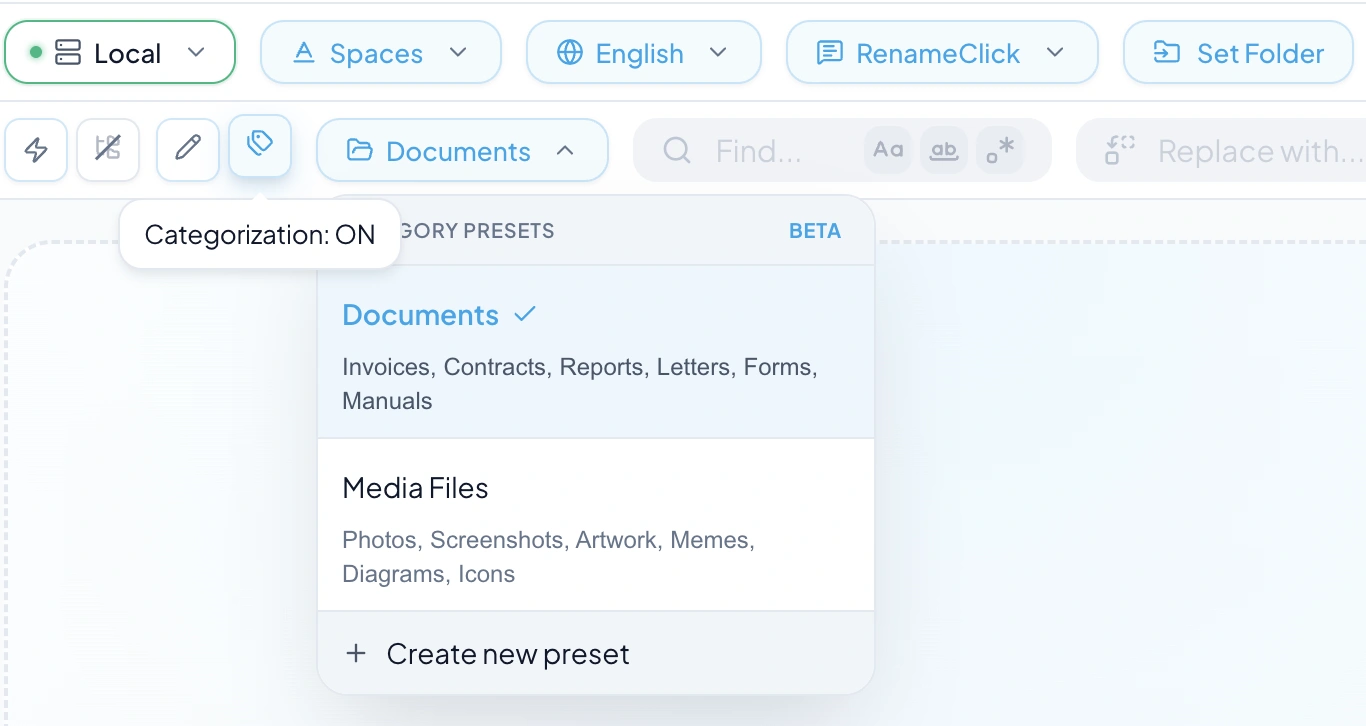
RenameClick's category presets can enforce this structure automatically. Create a custom preset with categories like Invoices, Contracts, Receipts, Reports, and Letters — then drop a mixed pile of documents and let the AI sort them.
A naming system for freelance documents
Your naming convention should answer three questions at a glance: when, what, and who.
Formula: [date]_[type]_[client/description].[ext]
2025-01-15_invoice_acme-corp_001.pdf2025-02-01_contract_website-redesign_startup-xyz.pdf2025-01-20_receipt_adobe-creative-cloud.pdf2025-03-10_proposal_mobile-app-development.pdf
With RenameClick, you can automate this: use a format pattern like $date{YYYY-MM-DD}_$lower{$1} and the AI will fill in the descriptive part based on the document's actual content.
Managing invoices and receipts
Invoices are your most critical business documents. A well-named invoice file should include the date, client name, and invoice number. This makes it trivial to find any invoice during audits or client disputes.
For receipts and expenses, the same logic applies — include the vendor name and amount when possible. A file called 2025-01-20_receipt_amazon-web-services_45-99.pdf tells you everything without opening it.
RenameClick's custom prompts excel here. You can write a prompt that instructs the AI to extract specific fields from invoices:
Extract from the document:
1. Date (YYYY-MM-DD format)
2. Client or vendor name
3. Invoice/receipt number
4. Total amount

Output format:
[date]_invoice_[client]_[number]
Organizing contracts and agreements
Contracts require special care because you may need to reference them years later. Best practices:
- Always include the effective date in the file name.
- Include the counterparty name (client, vendor, partner).
- Use a suffix like
_signedor_draftto track status. - Keep original signed versions separate from drafts.
Example: 2025-03-01_contract_website-redesign_acme-corp_signed.pdf. With RenameClick, the AI can read the contract content and suggest a name that includes the parties and subject matter.
Custom AI prompts for document data extraction
RenameClick's custom prompt feature lets you define exactly what the AI should extract from each document. This is especially powerful for repetitive document types where you want consistent, structured file names.
Example prompt for electricity or utility bills:
You are an information extraction system.
Input: a PDF of a utility bill.
Task: extract the payable date, total amount,
and account holder name.
Output: Utility_Bill__YYYY-MM-DD__Amount__Name
You can create different custom prompts for different document types and switch between them in RenameClick's prompt selector. The maximum prompt length is 1,800 characters — enough for detailed extraction rules.
Automating document sorting with Auto Flow
The ultimate freelancer workflow is set and forget. RenameClick's Auto Flow feature watches a source folder (like Downloads or a scanner output folder) and automatically:
- Detects new files as they arrive.
- Analyzes supported file content with the selected provider.
- Renames files based on your format pattern.
- Categorizes and moves them to the appropriate subfolder.
Set up a row with your Downloads folder as source and your Business folder as destination, enable categorization with your document preset, and every new invoice, receipt, or contract gets sorted automatically.
Preparing for tax season with organized documents
When your documents are named consistently and sorted into category folders, tax preparation becomes straightforward:
- Invoices folder → total revenue calculation.
- Receipts folder → all deductible expenses in one place.
- Contracts folder → proof of business relationships.
- File names with dates → easy to filter by fiscal year.
No more digging through Downloads or email attachments. Everything is already where it should be.
FAQ
What is the best way to organize freelance documents?
Can AI extract invoice numbers from PDFs?
How do I sort documents automatically?
Is my data safe with AI document processing?
What document formats does RenameClick support?
Want to try this workflow?
With the Local provider after the one-time model download, RenameClick can run offline and helps you rename and organize files by content with a review-first flow.